

Solar design and quoting software
Solar design software
that writes the quote.
For solar installers, and electricians who fit solar. Design the system on the customer's own roof, estimate what it will generate and save, and put it on a quote priced from your own items. Lay it out yourself, or ask Knack AI to draft the design from the job's address for you to check. The customer accepts online, and the install runs in the same app. Built in New Zealand.
On every plan, 3 solar jobs a month included: switch Knack Solar on in Settings · 30 days free · no credit card
- Their roof, from the LiDAR survey
- The design writes the quote
- Accepted online, then a job
What it does
One app, from the roof to the handover.
A solar job usually crosses three tools: one to draw the array, one to price it and one to run the install. Knack Solar does all three, so the system is typed in once.
- Reads the roof. Faces, pitch, direction and shade from the national LiDAR survey, offered for you to check. Or trace them by hand.
- Lays out and wires the panels. Place them yourself or have Knack lay them out, with the strings and the layout checked as you work.
- Estimates generation and savings. Modelled hour by hour for the site, against the household's own usage and power plan.
- Writes the quote. The design's equipment and materials become quote lines at your own prices.
- Shows the customer their roof. One link with the layout, the figures and the options, accepted online.
- Runs the install. The schedule, a solar checklist, the lines company pack and the handover pack.
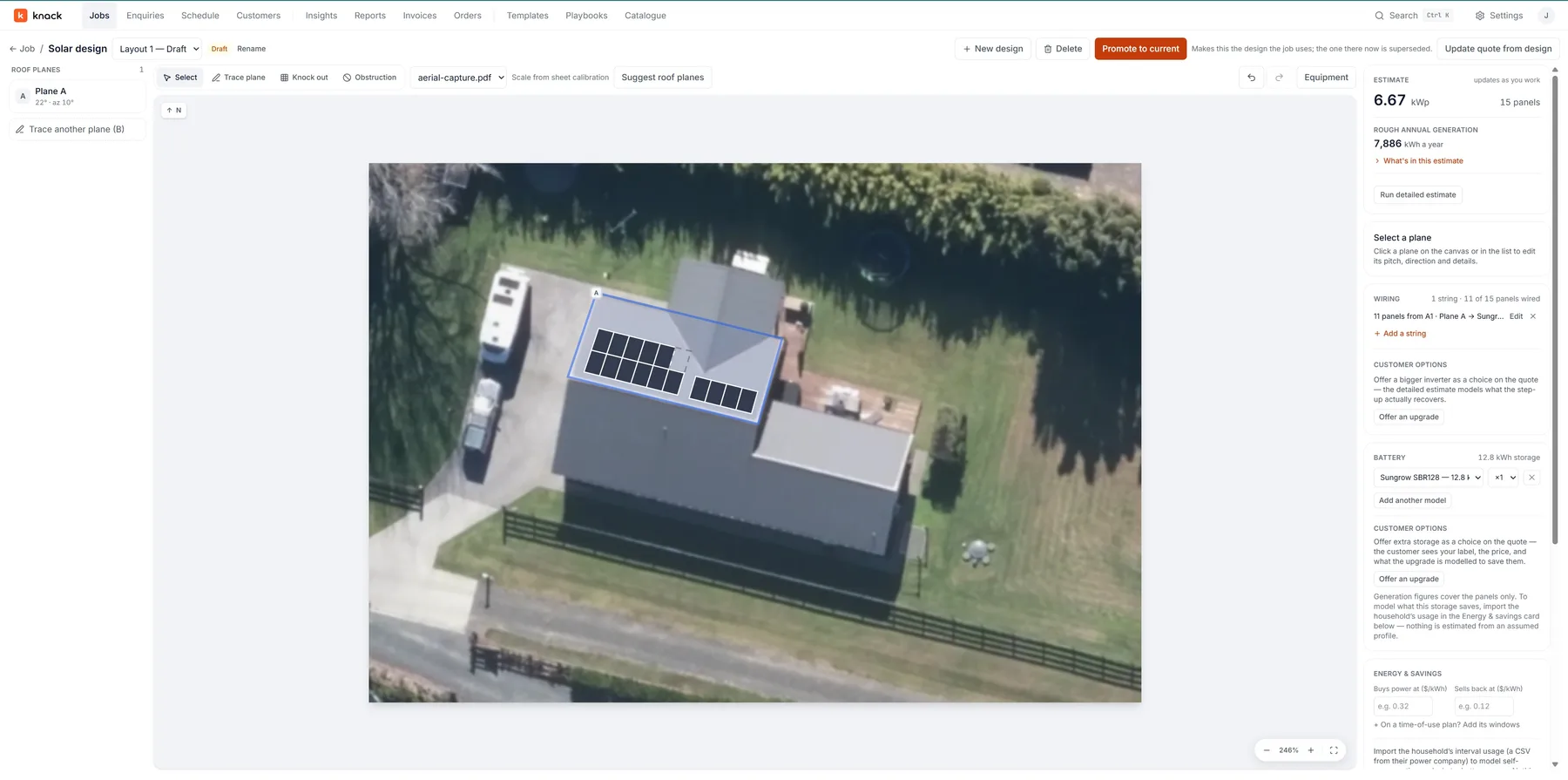
A real design: two roof faces from the LiDAR survey, eighteen panels laid on the north face.
AI solar design with Knack AI
Let Knack AI draft the design. You check the roof.
Knack AI is the chat beside your quote. With Knack Solar switched on, it designs solar too: on a job with a site address, ask for the system and it drafts the design and puts it on the quote, from your own equipment and your own prices.
-
Ask
Say the size, or don't
On an empty quote it offers Design a solar system for this roof. Add the size, the panel and the inverter, or leave the equipment out and it uses your own and says which it chose. Get the roof ready for solar reads the roof before any equipment is picked.
-
Roof and layout
It reads the roof and lays the panels
It finds the house on the aerial at the job's address, reads the roof faces off the survey, fills in their shade, lays the panels and wires them, and estimates the year's generation. A battery, backup gateway or EV charger you ask for goes on the design from your own list.
-
Quote
The design goes on the quote
The design's equipment and materials land on the quote from your items, and it names every line that has no price yet. Other work on the job, like a switchboard upgrade, is drafted as lines. Undo takes its lines off the quote; the design stays.
-
Yours to check
A draft until you've looked
Knack AI confirms no roof face. Its reply says the roof was read from the survey, not checked by a person, and the list under it opens the designer, where you check each face's pitch and direction, mark the skylights and flues, and change what you like. It can't draw or move a face, or send the quote.
Every reply carries the same line: “AI draft. Check it before you send.” How Knack AI quotes →
The roof
Start on their roof, not a blank canvas.
Open the designer on a job with a site address and it starts on an aerial of that address, with nothing to capture or draw first.
- Roof faces from the LiDAR survey. Where the national survey covers the address, Knack reads each face's outline, pitch and direction off it and offers them as suggestions. Nothing joins the design until you add it, and you confirm each face's pitch and direction once you've checked it.
- Aerial or LiDAR, one switch. Swap the picture under the roof between the aerial photo and the survey's relief, which shows the ridges, hips and valleys a soft photo or a tree hides.
- Or trace it yourself. Draw the faces by hand on the aerial or on a roof plan you upload, wherever the survey has no roof to offer.
- Shade per face. Each face takes its shade from the survey's surroundings, as an estimate you can overwrite. Mark the vents, skylights and flues the panels have to miss.
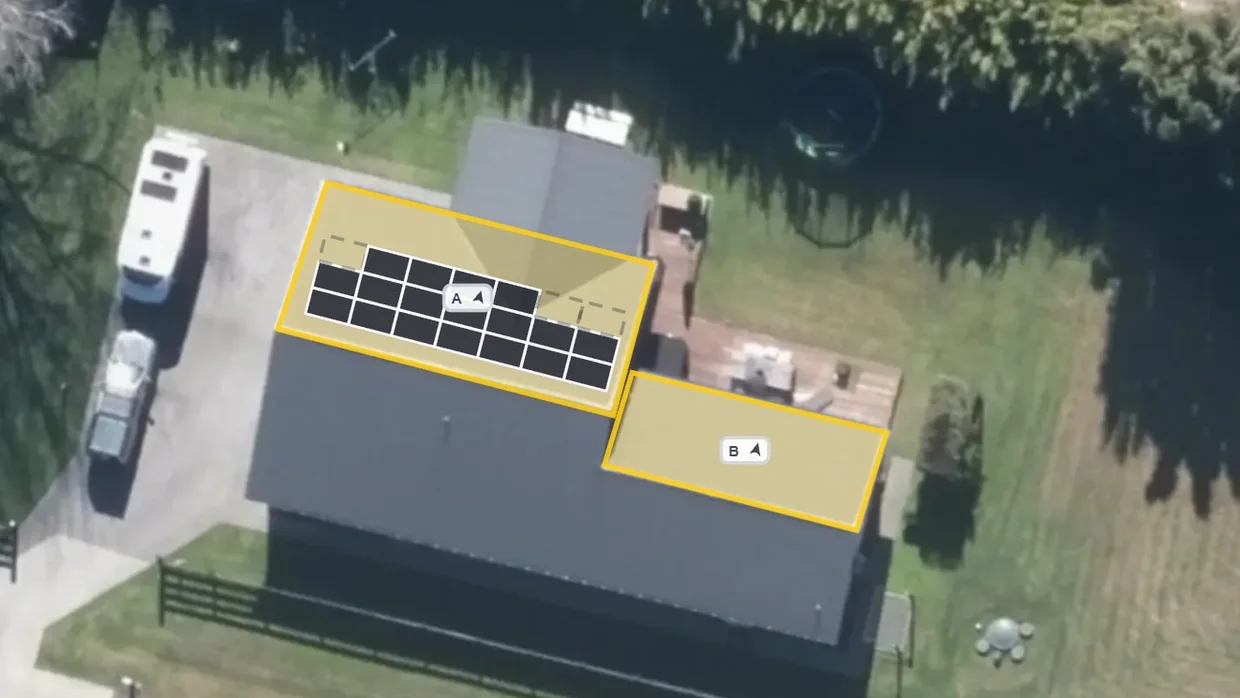
The same design, close up: each face outlined and lettered on the aerial, the panels laid on face A.
Layout and wiring
Lay it out, wire it, and see what needs a second look.
Place panel blocks yourself, or let Knack lay them out. Either way the designer checks the layout and the strings while you work.
-
Layout
Design it for me
Pick the panel, the inverter and the size. Knack fills the sunniest faces first and wires the strings. Fill this face and Wire it for me do one step at a time. These aren't AI: the same inputs give the same layout, and it's shown to you before anything is written.
-
Checks
Findings as you go
Each string's voltage against the inverter's limits at the site's coldest and hottest design temperatures, its current, the DC to AC ratio, and panels past the roof edge or inside the edge clearance. You read the findings and decide what to change.
-
Equipment
Models without the typing
Add panels, inverters, batteries, backup gateways and EV chargers from Knack's library, or drop the maker's spec sheet and check the figures Knack reads off it before you save the model.
-
Storage
Batteries your way
Mix battery models in one stack, and offer the customer a battery upgrade they can choose on the quote.
-
Drawings
For the electrician
Download the array layout and a basic single-line diagram as a PDF, marked for the electrician to check.
-
On site
The design goes with the crew
On a phone the design opens read-only, and the crew's job sheet carries the roof drawing with the panels on it.
Yield and savings
Estimates from their own power use, with the working shown.
A generation figure on its own doesn't sell a system. What the customer wants to know is what it does to their bill, so the estimate is built from how this house uses power.
-
Generation
Hour by hour, for this site
Each face's year is modelled hour by hour for the site's weather, pitch, direction and shade, then scaled to published New Zealand yield figures.
-
Usage
Their usage file, or a stated assumption
Import the household's usage data from their power company. No file yet? Start from a typical usage shape scaled to their yearly use or a typical monthly bill, and Knack labels it as an assumption.
-
Power plan
The rates off their bill
Import and export rates, time-of-use windows and the daily charge, plus the network's export limit and what it costs them.
-
Sizing
Every size, side by side
See what each size, from a few panels up to what the roof takes, would make, save and pay back. Knack shows you the ladder; you pick the size.
Quoting
The design writes the quote.
Press Update quote from design and the panels, inverters, batteries, mounting, DC cable and isolators go onto the quote as lines, priced from your own items at your markup. If the job has no quote yet, this starts one.
- Every missing price, asked once. Anything your items doesn't cover yet is listed together so you can price it in one go. A box you leave empty stays TBC, and an unpriced line holds Send until it has a price.
- Change the roof, update the quote. Move panels or swap the inverter and update again. A line you've edited by hand stays as you have it.
- Two sizes, one yes. Copy the design as another size, price each one on its own quote, and send both. The customer accepts one, and the other closes.
- See it as the customer will. Before you send, the builder's Customer view shows the solar part of the quote the way the customer will see it.
- A quiet second look. On a house you've recorded as two or more storeys, the optional line above Send names a quote with nothing on it for working at height. It never blocks Send.
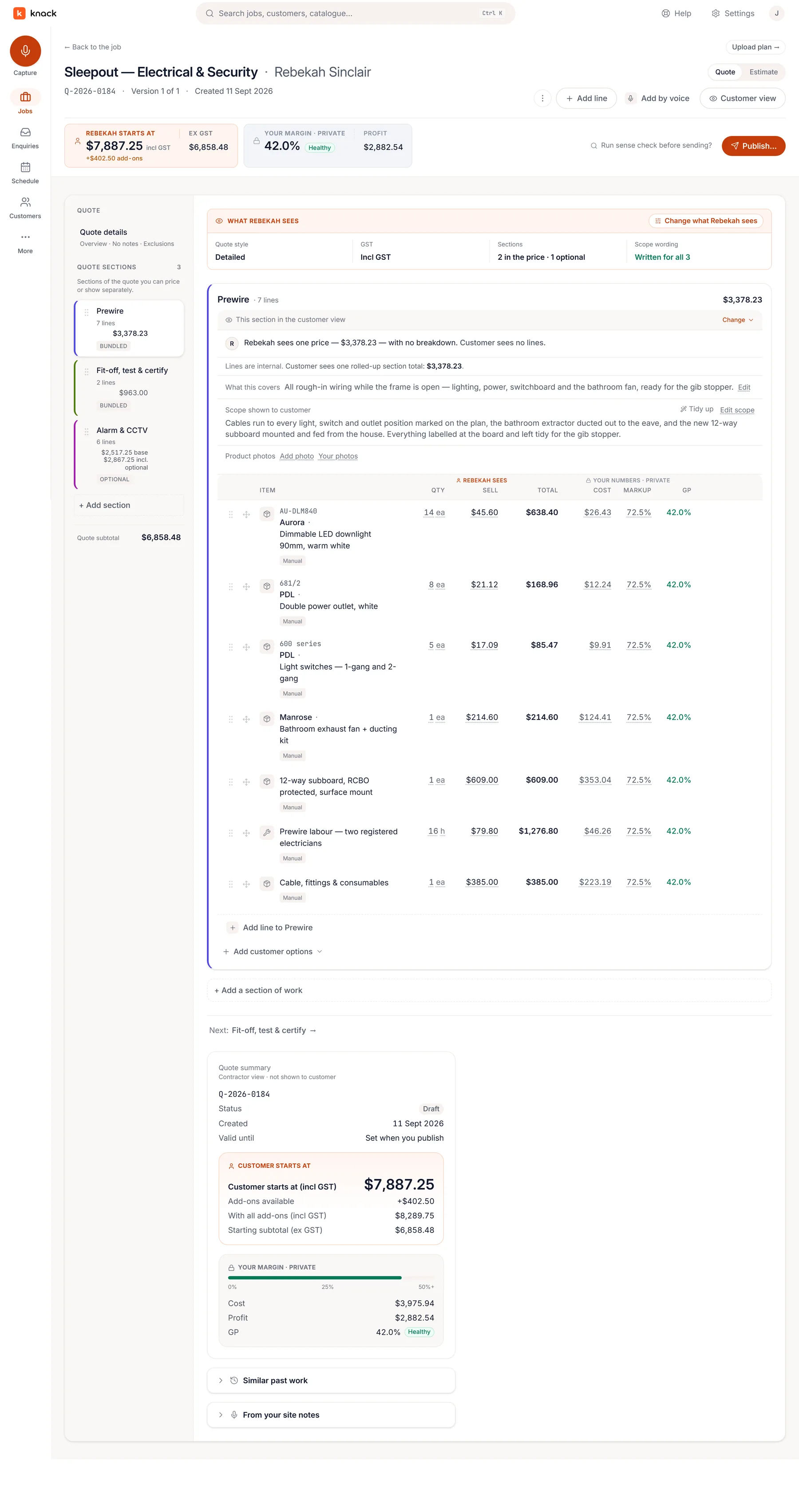
The quote builder, shown on an electrical job: your cost and margin on every line, one clean page for the customer.
The customer's quote
A proposal they can follow, on their own roof.
The customer opens one link on their phone or laptop. The solar part of the quote is built from the design as it was when you sent it.
-
The layout
Their house, from above
When the design was drawn on the aerial, the quote shows the customer their own roof with the panels drawn on it. The quote's PDF carries the roof and the options too.
-
The figures
And how they were worked out
Estimated generation and saving, the payback once the quote is priced, and a short card on how the figures were worked out: their usage, their rates, the export limit and the shade. It says plainly that these are estimates, not guarantees.
-
The equipment
Names they understand
The customer reads the maker and the rating, like a 9 kWh battery, while you and the crew keep the model codes.
After the yes
Accepted online, then it's a job.
The customer picks their options and accepts the quote online against the scope, and acceptance keeps the design and the figures they were shown. From there the install runs in the same job.
-
Schedule
Booked with the crew
Book the visits and assign the crew on Knack's schedule (Pro and Crew plans). The job sheet takes the roof layout to site.
-
Checklist
A solar checklist by stage
From the lines company approval to handover, the crew records serials, test readings, photos and documents against each item, on the phone or the laptop.
-
Lines company
The application, filled from the design
Knack fills a connection application pack from the design and the job, for you to check and submit on the lines company's own form. Record when it went in, and Knack shows the response times the Code sets as due dates. Knack never submits it for you.
-
Handover
One pack to the customer
The system as installed, your checklist and the evidence you attached, in one PDF you email to the customer from Knack. It's a record of the work and the documents, not a compliance ruling.
Or with your own AI
Already use Claude or ChatGPT? It can design it too.
The second way in: connect Claude or ChatGPT to Knack and ask it to design a system for the job. It reads the roof faces off the site, fills in the survey's shade and proposes a layout with a picture of each face. Once you've agreed it, it can wire the panels, put the design on the quote, model the year and show you what each size would save. That first pass confirms no roof face and applies nothing: it's a proposal for you to look at. Correcting a face, confirming the equipment figures it proposes, choosing the design the job uses and sending the quote all stay with you, in Knack. Connect your AI →
Knack AI needs nothing connected: it's built into the quote, and it can write your assumptions and exclusions and add the rest of the job from your items as well. How AI quoting works in Knack →
Said plainly
What Knack Solar doesn't do.
It's a design and quoting tool with the job attached. These are its edges.
-
The design
It doesn't sign off the design
The checks are findings for you to read, and the drawings are for your electrician to check. Knack makes no ruling on a design.
-
The figures
It doesn't promise a saving
Generation, savings and payback are estimates from the design, the usage and the rates you entered, and the customer's quote says so.
-
Lines company
It doesn't apply for you
It fills the application pack. You submit it on the lines company's own form and record the answer when it comes.
-
After install
It doesn't monitor the system
Knack carries the job to the handover pack. Monitoring stays with the inverter or battery maker's own app.
-
On the phone
It doesn't design on a phone
The designer needs a laptop or desktop screen. On a phone the design opens read-only, and the quote, the schedule and the checklist work in full.
-
Coverage
It can't read every roof
Roof faces come from New Zealand's national LiDAR survey, where it covers the address. Anywhere else you trace the faces by hand on the aerial or a roof plan.
Fair questions
Straight answers.
Who is Knack Solar for?
Solar installers, and electricians who fit solar alongside their other work. A solar business can run the whole job in it, from the roof to the handover pack. An electrician switches it on in the Knack they already quote in, and one quote can carry the solar system and other work on the job, like a switchboard upgrade.
Does Knack Solar cost extra?
Not to start. It's on every plan, and every plan includes 3 solar jobs a month. A solar job is a job that gets a solar design; more designs and options on the same job don't count again. The Solar add-on gives 20 more a month for NZ$49 + GST. The account owner switches Knack Solar on in Settings, under Your trade, and can switch it off the same way; switching it off hides the solar tools and deletes nothing. Booking the install on the schedule is on Pro and Crew. See the plans →
Can Knack AI design the system for me?
Yes, once Knack Solar is switched on. Ask it on the job's quote and it reads the roof at the job's site address, lays out and wires the panels with your own panel and inverter, and puts the design on the quote. It's a draft: it confirms no roof face, so check each face in the designer before you send. Give it the household's power use and the rates off their bill and it shows what each size would save, and you pick the size. Knack AI is on every plan.
Where do the roof faces come from?
In New Zealand, from the national LiDAR survey and aerial imagery, wherever the survey covers the address. Each face Knack finds is a suggestion until you add it, and its pitch and direction are marked as measured, not checked, until you confirm them. Where there's no survey roof, trace the faces by hand on the aerial or on a roof plan.
Are the savings figures guaranteed?
No, and the quote says so. They're estimates from the design, the household's usage and the rates on their power bill, and the customer's page shows how they were worked out. A figure from a typical usage shape says it is one.
Can I offer a bigger system or a battery as an option?
Yes. Copy the design as another size and send both sizes as options the customer chooses between, or add a battery upgrade to the design that the customer can pick on the quote.
Does it apply to the lines company for me?
It fills a connection application pack from the design and the job's records, for you to check and submit on the lines company's own form. Knack never submits it and never says a connection is approved; you record each answer as it arrives.
Can I design on my phone?
The designer is built for a laptop or desktop screen. On a phone the design opens read-only with its drawings, and the quote, the schedule and the solar checklist all work on the phone.
Do I have to quote in Knack too?
That's where it pays off. The design writes the quote, the customer accepts online, and the won job runs in the same place. The quote builder, sending and acceptance are the same ones electricians and security installers use. Knack for electricians →
Does it monitor systems after install?
No. Knack carries the job to the handover pack. Monitoring a system once it's running stays with the inverter or battery maker's own app.
More questions answered on the features page →
Design the next roof you have to quote.
Thirty days, every plan feature, no credit card, and 3 solar jobs a month included on every plan. Switch on Knack Solar in Settings and open the designer on a job you're pricing this week.