


Electrical takeoff software
Do the takeoff on the plan.
Send the quote from it.
Upload the PDF plan, box one downlight and Knack finds the rest on the sheet. Measure cable runs and floor areas to scale, then turn every count into a priced quote line at your own rates. No re-typing the tally into a spreadsheet, and nothing counted twice.
30 days free · every plan feature · no credit card
- PDF plans, scans and photos
- Counts, runs and areas, to scale
- Straight into the quote
Counting
Box one symbol. Knack finds the rest.
Counting points by hand is where a tender eats a Sunday, and where a missed downlight becomes one you install for free. In Knack the plan does the counting, and you stay in charge of what counts.
- Auto-count off the drawing. Draw a box around one symbol on the consultant's plan and Knack matches that shape across the sheet. Every hit shows as a candidate you accept or reject. It never adds anything to your count on its own.
- Or tap them in. Drop downlights, power points, switches, smokes and isolators from your own catalogue straight onto the plan. Each one is counted as you place it, with a running tally beside the sheet.
- Every floor in one place. Add a level for each storey, so a two-storey rewire keeps its upstairs and downstairs counts apart and still adds up to one job.
- No plan? Draw one. Sketch the rooms in the browser, or mark up a photo of the site. A plan you drew counts exactly like a plan you were sent.
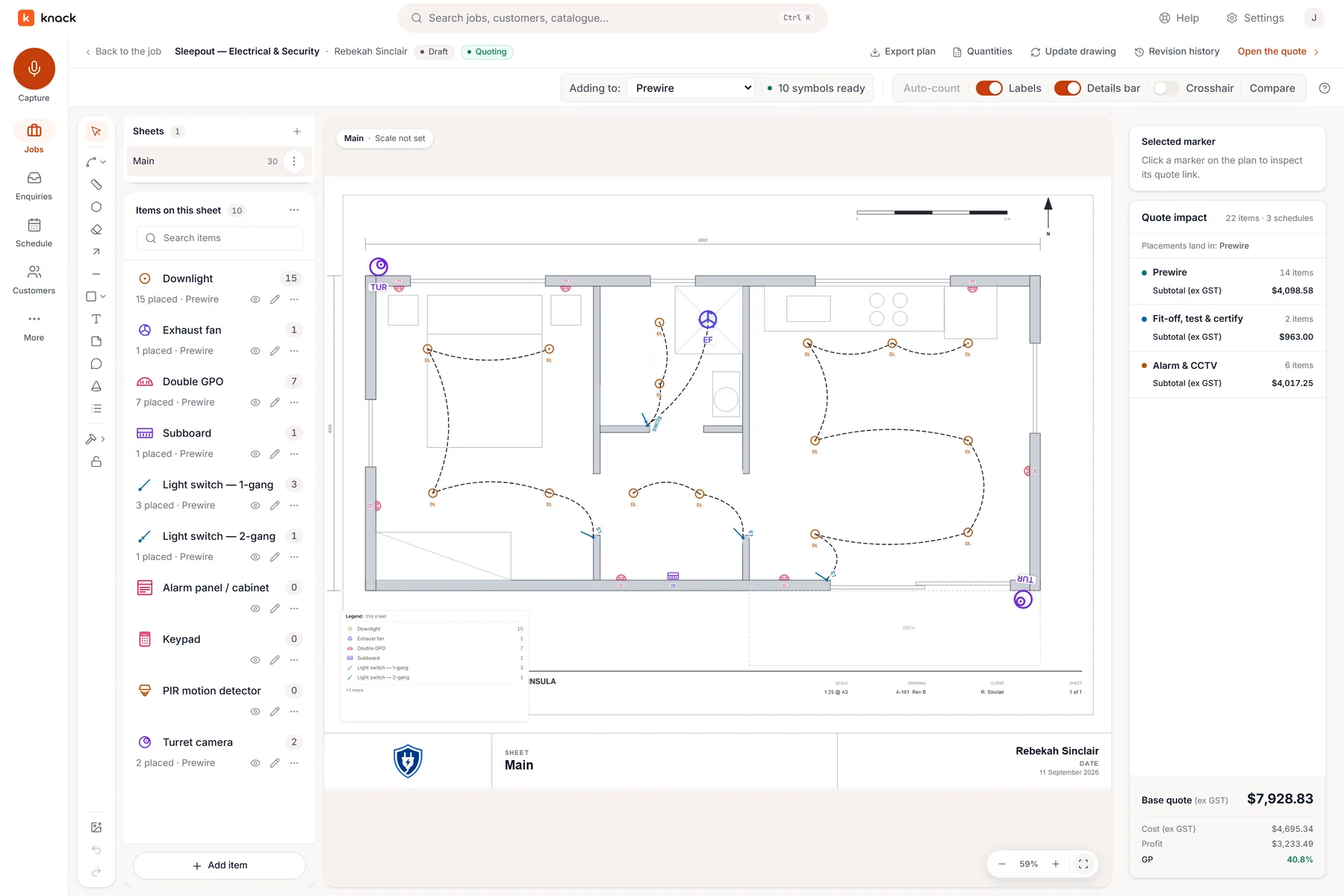
A real job: the sleepout takeoff, 15 downlights counted off the plan.
Measuring
Cable runs and areas, to scale.
Points are only half a takeoff. The cable, the conduit and the floor area are where the material cost hides, so Knack measures them on the same sheet.
- Set the scale once. Calibrate the sheet against a dimension you know. Until you do, Knack tells you the sheet is not to scale rather than pricing a guess by the metre.
- Trace the run. Draw a cable run or a circuit along the route it will actually take. It prices per metre, and an area prices per m².
- Allow for the real world. Add extra length and waste to a run, so drops, rises and offcuts are in the price instead of coming out of your margin.
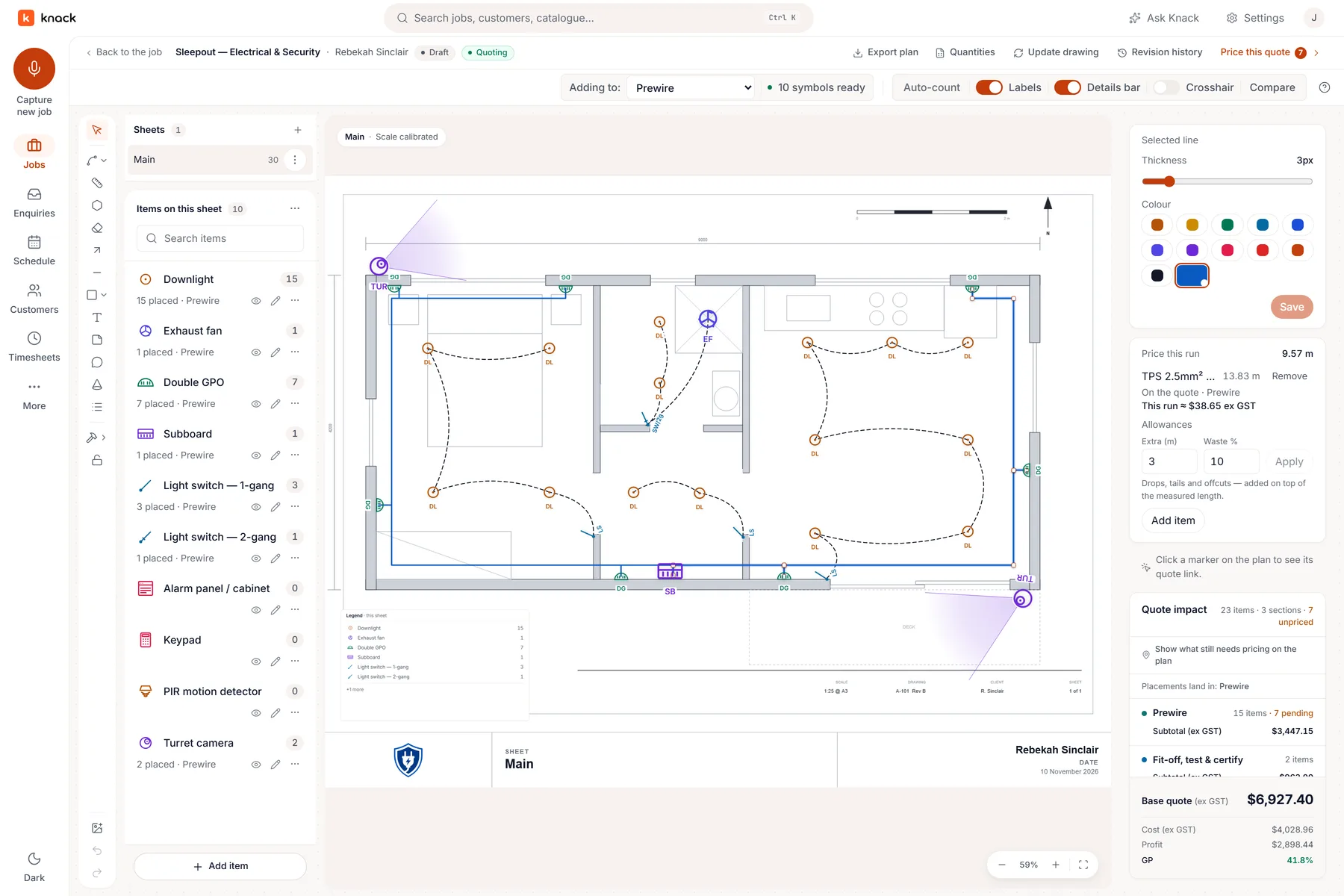
Calibrated off the 9 m dimension: 9.57 m measured, 13.83 m once the drops and offcuts are allowed for.
Pricing
The takeoff becomes the quote.
A takeoff tool that stops at a count leaves you re-keying it into the quote. In Knack, Create quote from plan turns every symbol, run and area into a quote line with its quantity already counted.
- A point, not a part. Build a recipe once for each kind of point (the fitting, its cable, the sundries and the minutes) at your own rates, confirmed once in settings. Every downlight on the plan then brings all of it with it.
- Your price book, not ours. Lines price from your own items and your supplier price files. Knack never claims to know what you pay.
- Change the plan, not the spreadsheet. The customer adds four more power points? Place four more. The count and the price move by four real amounts.
- A second look before it goes. Run the optional sense check before you send and it reads the plan and the quote together, for example a measured run with no priced line behind it.
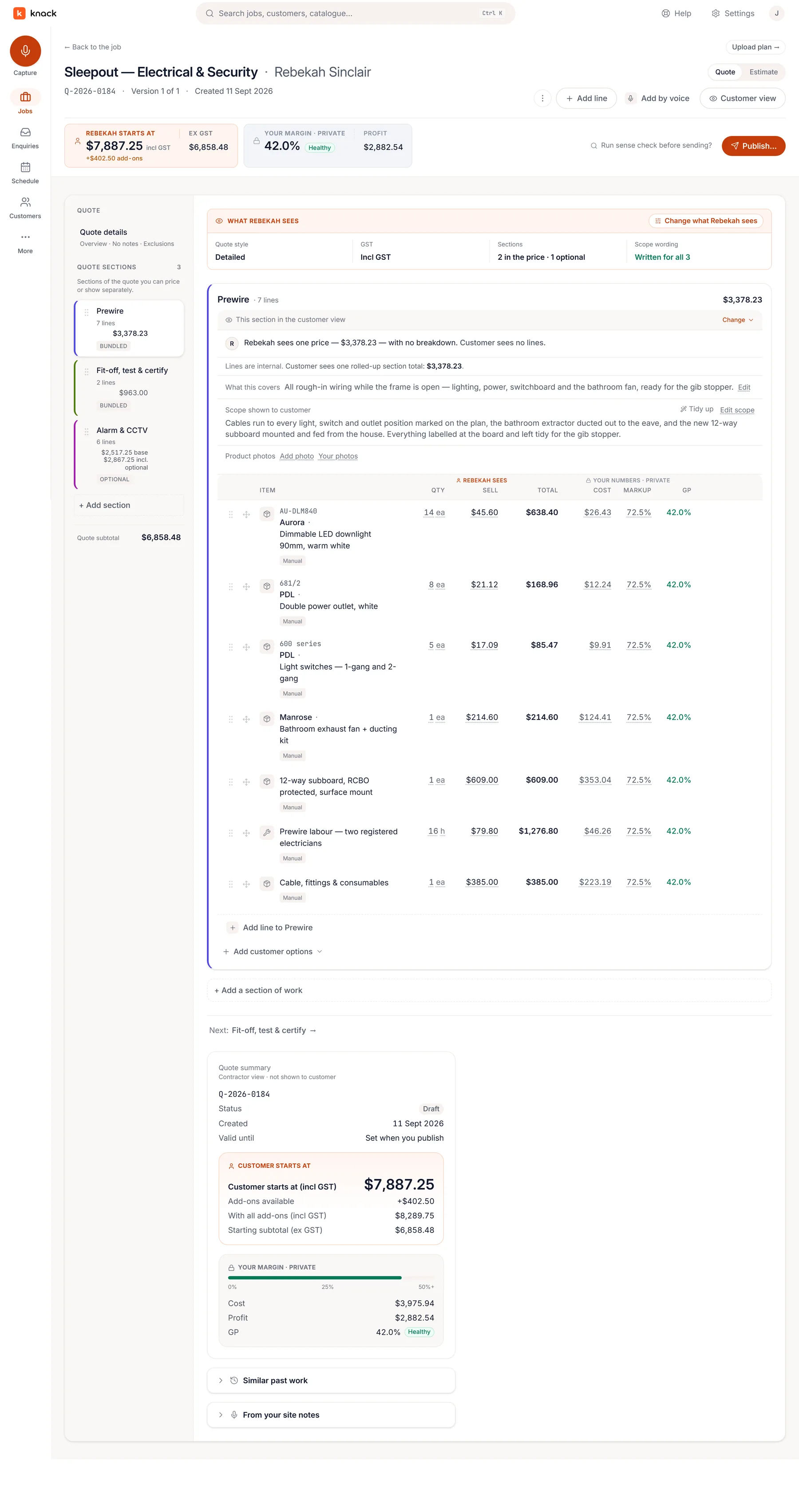
The counts arrive as lines. Your cost and margin stay on your screen.
Not just electrical
CCTV and alarm takeoffs, and your own AI.
Security installers get the same takeoff with camera, detector and keypad symbols from twelve manufacturer product lines, each drawing its published field of view on the plan or on real aerial imagery as a drawing aid for the conversation. Knack for security installers →
Already use Claude or ChatGPT? Connect it and it can read the drawings and the counts you made, then draft the quote lines from your price book for you to check. How it works →
Fair questions
Straight answers.
What is an electrical takeoff?
It's the count and measure you do off the plans before you can price a job: every light, power point, switch and smoke, the board, and the lengths of cable between them. The takeoff is the quantities; the quote is those quantities at your prices. Knack does both on the same screen, so the one feeds the other.
What plan files can I use?
PDF plans, and images: a scan, a photo of a paper plan, or an aerial of the site. Knack doesn't open DWG or other CAD files directly, so print or export the drawing to PDF first. No plan at all? Draw the rooms yourself in the browser.
How accurate is the auto-count?
You teach it one box at a time, and it shows you every hit as a candidate to accept or throw out. It never silently adds to your count. On a messy scan you'll reject a few; on a clean consultant PDF it's the difference between an evening and a coffee. Either way, the count is the one you approved.
Can I do the takeoff on site, on a phone or tablet?
Yes. The takeoff is tap-on-the-plan in the browser and in the Knack apps for iPhone and Android. Plan marks made off-signal sync when you're back in coverage, and the same plan is waiting on the laptop when you get to the office.
Do I have to use Knack for the quote too?
That's where it pays off. The takeoff seeds the quote, the customer accepts it online against the scope you counted, and the won job goes onto the schedule with the plan attached for the crew. You can also export the marked-up plan to share it.
What does it cost?
Plans from NZ$49 + GST a month for the whole business, with no per-user fee. The takeoff is part of the quoting workflow every plan gets, and the 30-day trial has every plan feature with no card. See the plans →
More questions answered on the features page →
Bring the next plan you have to price.
Thirty days, every plan feature, no credit card. Upload the drawings for a job you're quoting this week and count it in Knack.