
AI quoting software
AI quoting software
that drafts from your own items.
Type the job into Knack AI, right beside the quote. It drafts the Sections and lines from your own items, recipes and past quotes, and you watch the quote fill in as it works. Ask for changes, undo any step, and send it yourself. Already use ChatGPT or Claude? Connect it to Knack instead.
Knack AI is on every plan, Starter included · every answer is a draft · 30 days free
- Your prices, not an average
- Undo any step
- Nothing sends without you
Knack AI
Type the job. Watch the quote build.
Knack AI is the chat beside your quote, on the laptop and on the phone. It's built into Knack, so there's no AI account to connect and nothing to set up.
-
Step 1
Tell it the job
“Kitchen and lounge rewire, twelve downlights, eight double power points, new subboard.” Type it as you'd say it to the apprentice.
-
Step 2
Watch it build
It searches your items, reaches for your recipes, looks at what you charged on similar jobs, and writes the lines into Sections. They land on the quote as it works, and it names each step as it goes.
-
Step 3
Ask for changes
“Make the switches black.” “Add a surge protector to the board.” “Write my assumptions and exclusions.” Each request lists what it added, changed or removed.
-
Step 4
Undo, check, send
Undo any request and it's reversed line by line; a line you've edited since is left as you have it. Then check the draft and press Send yourself. Knack AI can't send, accept or invoice anything.
Every reply carries the same line: “AI draft. Check it before you send.”
From the Jobs page
One box for quoting and booking.
The Knack AI box sits at the top of the Jobs page. You pick what it's for before you type, so it never has to guess.
-
Quote a job
From a description to a draft
Describe the work and pick or add the customer. Knack makes the job and a blank quote, and Knack AI drafts it while you watch.
-
Book a visit
A filled form, not a surprise booking
“Sam at the Henderson job Tuesday 9am, 3 hours.” It fills in the booking form for you to check. Nothing is booked until you press Save. Scheduling is on Pro and Crew.
-
Ask a question
How do I…?
Questions about using Knack go to Help, which answers from Knack's own guide.
For your trade
It drafts the way your trade quotes.
Knack AI doesn't bring a price list of its own. It works from your items, your recipes and the trade pack your workspace runs on, so the draft looks like one of your quotes.
-
Electricians
Points, not parts
Ask for twelve downlights and each brings the cable, sundries and labour minutes your recipe gives it. Name the switchgear range and colour and it's recorded for this job, so the draft stays in range and tells you when nothing in range fits. Knack for electricians →
-
Security installers
Cameras and alarms from your kit
Camera, detector and keypad points come from your own recipes and items. A camera system stays with brands that work together unless you ask it to mix them, and it names any line outside the range you set. Knack for security installers →
-
Solar installers
It designs the system, then quotes it
With Knack Solar switched on, ask Knack AI for a solar system and it reads the roof at the job's address, lays out and wires the panels with your own equipment, and puts the design on the quote. It confirms no roof face: you check the roof in the solar designer before you send. A connected Claude or ChatGPT can design from the site too. Solar design in Knack →
Where the prices come from
Your items, not the internet's.
A chatbot asked to price a rewire guesses. Neither Knack AI nor a connected AI prices anything from thin air: every line comes back to something you set.
- Your own items. Import the list you already price from. Parts come off it at your cost and your markup, and a supplier price file can keep it current on a schedule or by email.
- Your recipes. A downlight point brings its cable, its sundries and its labour minutes with it, the way you build it. So does a power point, a camera or an isolator.
- Your rates, confirmed once. Nothing goes onto a quote at a price until you've confirmed your own rates in settings.
- Your past quotes. It reads what you've charged on similar jobs, and what Knack has learned your jobs usually include, before it drafts.
- A gap stays a gap. Where your items have nothing that fits, it leaves an unpriced note and says so, so you can add the item rather than send a guess.
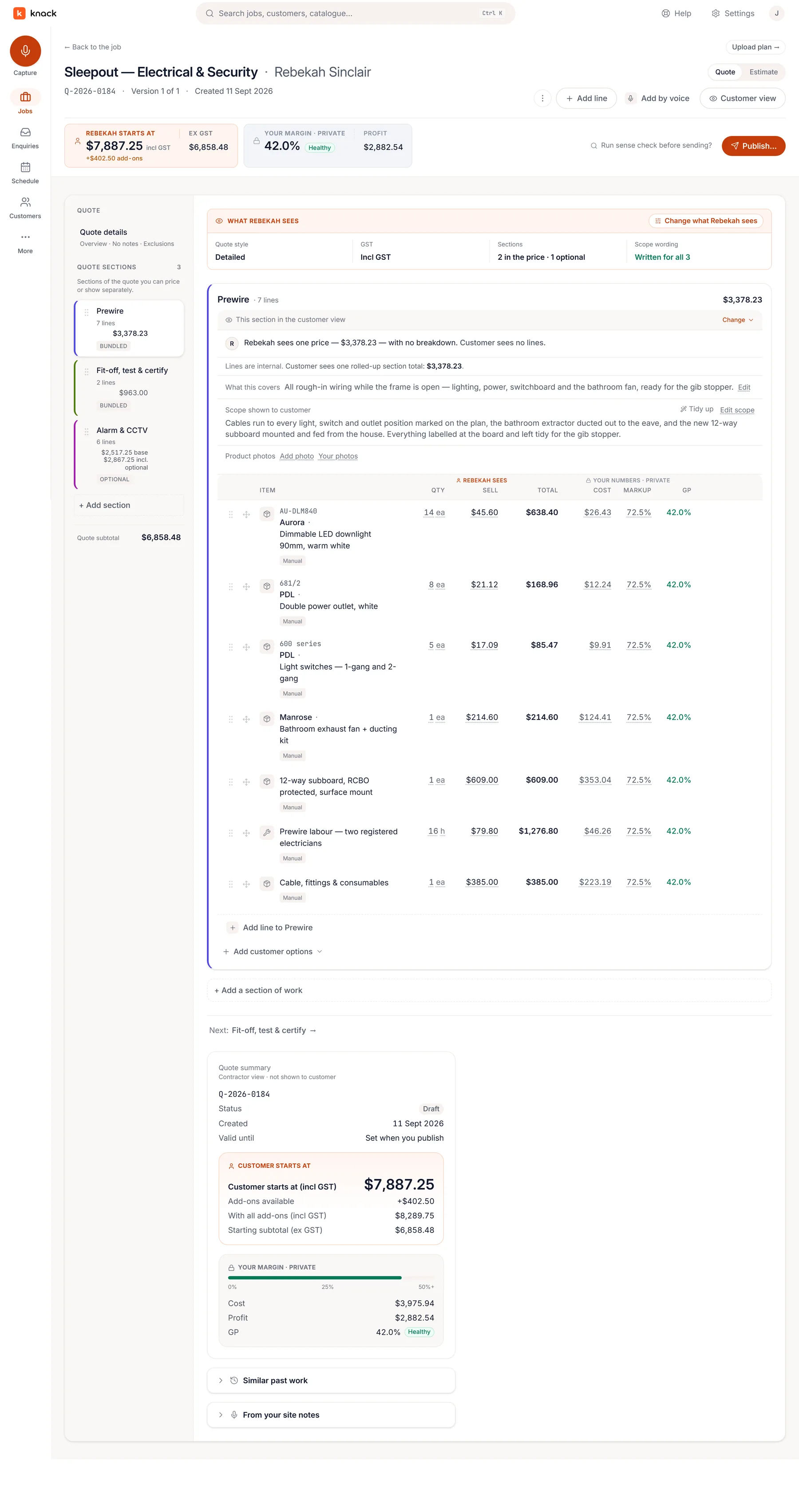
The quote builder: your cost and margin on every line. Your customer sees one clean page.
Or bring your own AI
Already use ChatGPT or Claude? Connect it.
Knack's connector lets Claude, ChatGPT or Grok work inside Knack, signed in as you, on the subscription you already pay for. It reaches further than the panel in the builder: it opens the drawings and site photos, and works across the whole job.
-
Step 1
Count it off the plan
Upload the PDF plan, box one downlight and Knack finds the rest on the sheet as candidates you accept or reject. That count is the count of record: the AI starts from it and asks before it changes one.
-
Step 2
Tell your AI the job
In ChatGPT, Claude or Grok, or Claude Code, Cursor or Codex on a laptop. It reads the job's working pack (your items, rates, recipes, terms and how you write) and opens the drawings and site photos itself.
-
Step 3
It writes a draft quote
Lines linked to your own items at your prices, anything unknown left TBC, and every tool it reaches for named on screen as it happens, so nothing touches your job that you can't watch.
-
Step 4
You check it and send it
Open the draft in the builder, change what you like, and send it from Knack. The AI can't send a quote to your customer, and it can never delete a quote, a job or a customer.
Three kinds of AI quoting
What "AI quoting" can mean.
The words cover very different things. Worth knowing which one you're buying. Knack does the second and the third.
-
A chatbot on its own
Smart, but it has never seen your prices
You paste the job in, it writes something plausible, and you re-type it into your quoting tool. Its prices are general guesses, and nothing it writes is linked to the parts you actually buy.
-
AI inside your quoting tool
Knack AI: on the quote, from your items
It works on the quote in front of you, from your items and recipes, with every request listed and undoable. Nothing to connect and nothing extra to pay for.
-
Your AI, connected to Knack
The model you already use, with your job in front of it
Claude, ChatGPT or Grok, signed in as you, with your items, your drawings and your rates to work from, writing a draft straight into the job. When the model gets better, so does your quoting.
Is AI quoting accurate?
As accurate as your items and the facts you give it.
An AI estimate is only as good as what it works from, which is why Knack hands it your real prices and recipes, and your own count off the plan, rather than letting it guess any of them. It says what it assumed, and anything it couldn't price is left for you to fill in instead of an invented figure. Before you send, an optional sense check reads the drawing and the quote and flags lines worth a second look. Then it's your name on the quote, and you read it like it is.
What it costs
Knack AI is on every plan.
Knack is from NZ$49 + GST a month for the whole business, with everyone in one workspace at no extra cost. Every plan includes Knack AI requests each month: Starter 100, Pro 250 and Crew 500. Each thing you ask it to draft or change is one request, and one that doesn't finish isn't counted. When they run out, Knack AI pauses until the 1st of the next month, and your own quoting and the connector carry on as normal.
The connector is on every plan too, Starter included. That AI runs on your own ChatGPT, Claude or Grok account, so you pay that company for it, not us: Knack doesn't resell a model or mark one up. Thirty days free, every plan feature, no card. See the plans →
Rather do it yourself?
Every part works by hand.
Everything the AI does in Knack also works without it: the takeoff counts off the plan, recipes price each point, and the builder keeps cost, markup and margin on screen while your customer sees one clean total. Voice notes that draft scope lines on site are there too, though we're still tuning them. See the takeoff →
Questions tradies ask
Straight answers.
Will it work for my trade?
Knack is built for electricians and security, CCTV and alarm installers, with trade packs for both, and Knack Solar for solar installers, which any workspace switches on in Settings. Knack AI drafts from what's in your own items and recipes, and the builder, sending and acceptance work the same for any trade. Solar design in Knack →
Can it quote from plans?
Yes. Upload the PDF plan (or a scan or photo of one), count it in Knack and create the quote from the plan, then ask Knack AI to fill in or change the rest. A connected AI opens the same drawings itself while it works. Knack doesn't open DWG or other CAD files; export a PDF first. How the takeoff works →
Will the AI send something wrong to my customer?
It can't. Nothing is ever sent automatically: AI output in Knack is always a draft, and the quote goes to your customer only when you press Send.
What happens to what I type into Knack AI?
To draft the quote, Knack sends your request and the job's working pack (your items, recipes and what this customer was quoted before) to the AI service named on our Subprocessors page. Knack AI is there for the people on your team who price quotes, and it only works on the quote it was opened on.
What can my AI see once it's connected?
What it needs to quote: your customers and sites, drawings and site photos, past quotes, recipes and items, costs and margins. It can add and correct customers and jobs and change your pricing when you ask it to, and it tells you each quote line it adds, changes or removes. Knack sends nothing to any AI provider: your AI asks for what it needs, signed in as you, and you can switch it off in Settings. Knack's own AI features, Knack AI and voice notes, are a different door, named on the Subprocessors page. Where your data goes →
Do I need to pay for ChatGPT or Claude?
Not for Knack AI: its requests come with your plan. The connector uses your own ChatGPT, Claude or Grok account, so whatever that account needs is between you and them. Each setup guide says what to expect: ChatGPT, Claude, Grok.
Does it work in New Zealand?
It's built in New Zealand, for New Zealand contractors: plans priced in NZ dollars plus GST, and CoC and ESC certificates for electricians on Pro and Crew, issued from the job with no AI anywhere near the form.
Comparing tools? See Knack against Tradify, Fergus and ServiceM8 →
Type your next job into Knack AI.
Thirty days, every plan feature, no credit card. Knack AI is in the quote builder from your first quote, or connect the AI you already use in about two minutes.