

Knack vs the job-management tools
Win the job in Knack.
Then run it there too.
Tradify, Fergus and ServiceM8 are built around the work you already have — the diary, the job card, the invoice. Knack is built around the part that decides whether you get it: pricing the job properly, and getting a clean yes. Then the job you won is booked, crewed and costed in the same place, and you move across at your own pace. Here is the honest side-by-side, including the things they do better.
30 days free · every plan feature · no credit card
- Built in New Zealand
- Priced per workspace, not per user
- Move across at your own pace
Side by side
Eleven things worth asking about.
Checked on each company's own site, not a review aggregator. Where they are ahead of us, the table says so — the rows we win are worth more if the rows we lose are honest.
| Capability | KnackQuoting first | TradifyJob management | FergusJob management | ServiceM8Field service |
|---|---|---|---|---|
| Counts the takeoff off the planSymbols, runs and areas becoming quantities | Mark the PDF, it counts itself | You can attach the plan as a file | Points you at Groundplan — another product, another subscription | Measures the room through the camera; marks up a PDF. Neither becomes a quantity |
| The customer marks the drawing to ask for a change | Pinned on the plan, inside the quote link | Comments on the quote | Not found | A question form on the quote |
| A voice note becomes draft scope | Talk the job as you walk it | No voice capture. Its AI reads supplier invoices and tidies wording | No voice capture found | Video is transcribed — but its quote drafting is documented as needing around 100 finished jobs first |
| Options the customer picks inside one quote | Choice groups and optional extras | Optional add-ons. A customer can tick several, so tiers aren't enforced. Pro plan and up | Good, better, best — added April 2026 | Proposals, with multiple-choice sections |
| A signed record of exactly what was acceptedScope and terms frozen at the moment they agreed | Declaration-bound, frozen against the terms as sent | Accepting online is a click; signing happens on your phone on site | Approval by email link, no login. Its signature is for certificates and sign-off | An optional signature field on the quote |
| What you pay for | One price for the workspace. Everyone included, nothing metered per job | Per user, per month, on top of a feature tier | Per user, per month, on top of a feature tier | Per month with users unlimited — metered by job credits |
| Works offline on site | Today's jobs saved to the phone. Quotes, plan marks and new jobs made off-signal sync when it's back | Needs a live connection | Offline mode | Offline is first-class |
| NZ electrical certificatesCertificate of Compliance, Electrical Safety Certificate | Included on Pro and up — issued from the job, on the phone | Included on their upper plans | NZ electrical and gas certificates | A store of prebuilt forms, written to Australian standards |
| Live pricing from your wholesalerSupplier prices kept current without re-keying | Price files fetched on a schedule or by email; direct supplier connections still to come | Supplier price lists imported by hand | Live account pricing from NZ wholesalers | Not found on their site |
| Invoicing and payments | Sends the invoice, approved in your Xero (NZ). Xero keeps the books; no card payments or reminders yet | Yes, and deeply | Yes, and deeply | Yes, including tap to pay on site |
| Timesheets and payroll | Timesheets yes, feeding job costing; the approved week hands off to payroll, but Knack never calculates pay | Yes | Yes, feeding job costing | Yes |
Swipe the table sideways to see every column.
Every cell checked on that company's own website or help centre on 12 September 2026, not on a review site. Products change — if something here has gone out of date, tell us and we'll correct it. We don't publish their prices: those move, and a stale number helps nobody.
Where the gap is widest
The plan does the counting.
This is the part a job-management tool leaves to you and a spreadsheet. Mark up the consultant's PDF or draw the plan yourself, and symbols, cable runs and areas count themselves, to scale, in the browser — then flow straight into the quote.
- Auto-count off the drawing. Box one downlight and Knack finds the rest of them on the sheet — fourteen downlights becomes fourteen counted placements, not a tally on the back of your hand. Every hit is a candidate you accept or reject.
- A point, not a part. A downlight point brings its cable, its sundries and its labour with it — at your rates, confirmed once in settings. So does a GPO, a camera, a switch, a smoke or an isolator.
- No plan? Draw one. Walls, openings and scale in the browser — a plan you drew counts exactly like a plan you were sent.
- Talk the job as you walk it. Voice notes come back as draft scope lines, ready for you to check and price before you reach the van. Every line is a draft until you say otherwise.
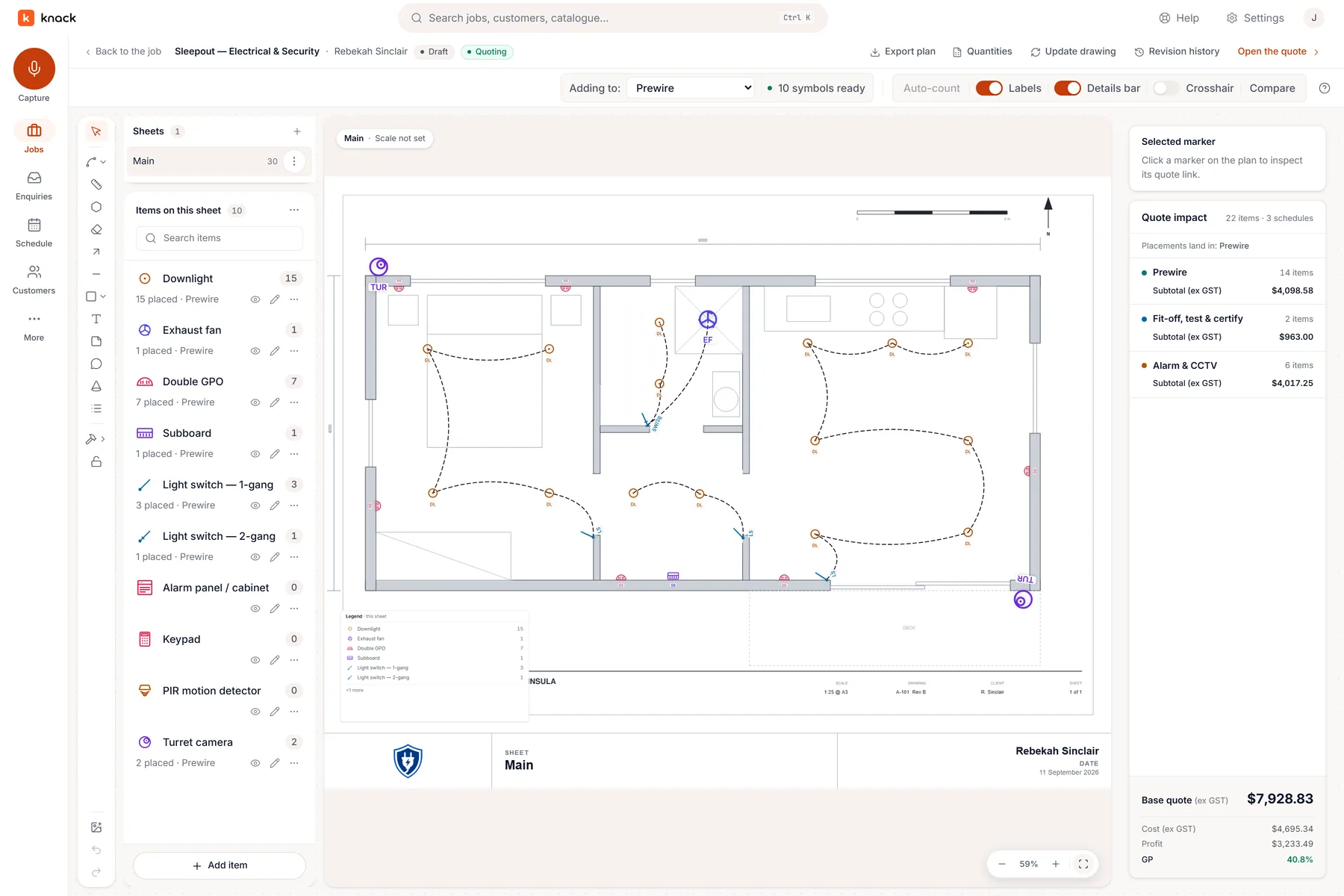
A real job: the sleepout takeoff, counted off the plan.
The moment that decides it
A quote they can answer, not just read.
Accepting online is table stakes now, and the good tools all do it. Two things are still rare: letting the customer point at the drawing to ask for a change, and freezing exactly what they agreed to at the moment they agreed it.
- Good, better, best on one quote. Choice groups and optional extras let the customer upgrade the switchboard or add the garden circuit without a second visit.
- Changes come back as pins, not phone calls. The customer marks what they want moved on the plan inside the quote link; you see exactly what they mean, and nothing changes until you re-issue.
- A recorded, declaration-bound yes. Acceptance happens on the web, against frozen terms and scope, in your own branding — a clean record to invoice against when the scope argument comes months later.
- Internal build-up, simple presentation. Inside Knack the quote carries your cost, markup and margin line by line. The customer sees one clean page and never sees any of it.
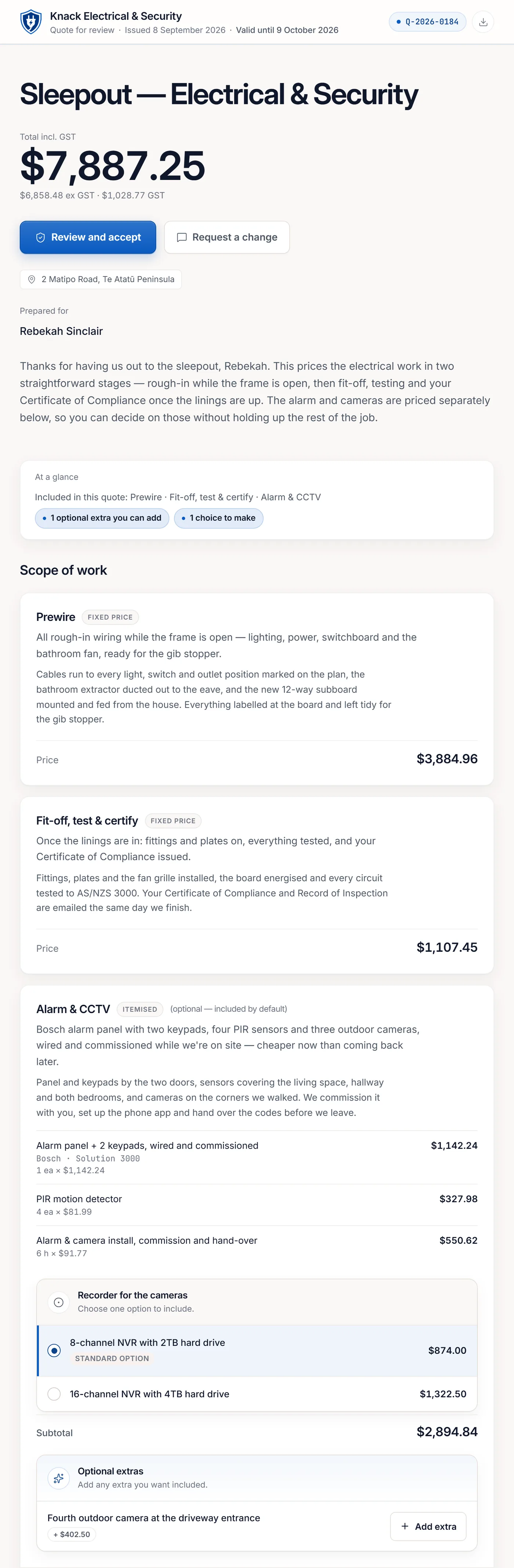
What your customer opens. Your branding, not Knack's.
The bill at the end of the month
Priced like a workspace, not a headcount.
Plans start at NZ$49 a month for the whole business — your estimator, your office admin and your crew share one workspace at no extra cost. Tradify and Fergus both charge per user per month on top of a feature tier, so the bill grows with the team and again with the plan. ServiceM8 doesn't charge per user either, but meters you by job credits. Knack does neither: one price, everyone in, nothing counted per job. See the plans →
The other side of it
Where they'd beat us.
All three are mature products with years on us in places. If what follows is what you need most, buy theirs — you'll be happier, and we'd rather say so here than after you've paid.
-
Tradify
The whole job, down to the paid invoice
Tradify runs the job all the way to the money — invoicing, deposits and a two-way Xero sync, which Knack deliberately stops short of. Subcontractors on their plan cost nothing, and they ship a new phone release most weeks. If you want one system from the enquiry to the bank, this is the one built for it.
-
Fergus
The wholesalers you actually buy from
Live, account-specific pricing from the NZ trade suppliers — Corys, Ideal, J.A. Russell, Redpaths, Bunnings trade pricing inside the quote. Knack now pulls supplier price files on a schedule, but a direct live connection to a wholesaler's system is still to come. Add timesheets feeding real job costing, payments, and an Auckland-based support line since 2012.
-
ServiceM8
The best day on the tools
A decade of polish on the job card — forms with a store of prebuilt templates, photos, checklists, an Apple Watch app and CarPlay. It also shows your customer the van approaching on a live map, which Knack deliberately doesn't do. If your pain is running the crew rather than pricing the work, this is the one to look at.
One thing worth saying plainly: two of these are New Zealand companies and the third is Australian. This isn't a story about a local product versus foreign ones — it's a story about quoting depth versus job-management breadth.
Said plainly
What Knack deliberately doesn't do.
Not a roadmap, and not a list of gaps — these are decisions. If you need them in one system, one of the others is the better buy, and this page would rather you knew now.
-
Never
A second set of books
Knack sends your invoice, but it never chases a debtor or keeps its own record of what anyone owes you — that stays in Xero, where your bookkeeper already looks. No aged-debtors list, no interest, no statements. This is a decision, not a missing feature: one ledger, never two that disagree.
-
Hours only
Timesheets and payroll
Knack keeps timesheets — each person's hours for the week, on the sheet the office approves — because that is what makes a job's labour cost honest. It stops at hours: no pay rates on the sheet, no award or Holidays Act interpretation, no overtime rules, no leave balances, no HR. The approved week leaves as a CSV for any payroll system, or as a draft timesheet in Xero Payroll for a person to check and post. Knack records the hours; it never calculates pay.
-
Hand-off
Your books stay where they are
An accepted job hands off to Xero as a draft for you to check — or, if you choose, Knack approves it in your Xero and emails your customer the invoice, deposit first if the quote asked for one. It can also go to Fergus as a job while you're still moving across. Knack never chases a payment, and your books stay in Xero.
Fair questions
Straight answers.
Do I have to drop the system I already use?
Not on day one — move across at your own pace. Start by pricing your next job in Knack. While you're switching, an accepted job can push straight out to Fergus as a job, or to Xero as a draft invoice, so the rest of your week keeps running where it runs today. When you're ready to run the job in Knack too, the schedule, the crew, the timesheets and the job costs are already there — and your customer list comes straight across from a connected Fergus account, or from a Fergus, Tradify or ServiceM8 export.
Is this another job-management system I have to migrate everything into?
There's nothing to migrate. Knack starts where the work actually starts — an enquiry in your inbox — and runs it through quoting to a signed acceptance, then onto a schedule so the won job gets booked and done. What it deliberately doesn't do: debt chasing or a second set of books. Your accounts stay in Xero.
Am I paying for every person on the team?
No. Knack is priced per workspace, not per seat. Invite your estimator, your office admin and your crew at no extra cost — they share one workspace, one set of records and one monthly voice allowance. Roles control who sees costs and margin.
Will the guys on the tools actually use it?
Knack is on the App Store and Google Play, so if your crew want an icon on the home screen they can have one. But the reason it works on site is parity, not the download: there's no cut-down field app to learn — the schedule, the job and the quote are the same screens they'd see on a laptop, laid out for a phone. And if all they need is to know where they're going, they can subscribe the calendar app they already use, and install nothing at all.
Does Knack do invoicing?
Yes, with Xero, in New Zealand. Once you turn it on, Send invoice on the job approves the invoice in your Xero — the deposit straight after acceptance, the balance when the job's done — and emails it to your customer with your bank details and the job number as the reference. Xero keeps the books and says what's been paid; Knack never chases a payment or keeps a ledger of its own.
More questions answered on the features page →
Don't take the table's word for it.
Thirty days, every plan feature, no credit card. Put the next job you have to price through Knack and through whatever you use now, and see which one you'd rather send.