

Knack for electricians
Price the rewire off the plan,
not off a guess.
Talk the job as you walk it, mark up the plan, and the takeoff seeds a quote that carries your real cost, markup and margin behind the customer's price. They sign it online, the won job lands on the schedule, and the paperwork drafts itself from the work you already recorded.
30 days free · every plan feature · no credit card
- Built in New Zealand
- Your quotes in NZD, incl. GST
- Made for the way you already quote
The takeoff
The plan does the counting.
Mark up the consultant's PDF or draw the plan yourself. Symbols, cable runs and areas count themselves, to scale, in the browser — and every count flows straight into the quote.
- Auto-count off the drawing. Box one downlight and Knack finds the rest of them on the sheet — fifteen downlights becomes fifteen counted placements, not a tally on the back of your hand.
- A point, not a part. A downlight point brings its cable, its sundries and its labour with it — at your rates, confirmed once in settings. So does a GPO, a switch, a smoke or an isolator.
- Your switchgear, every time. Say “Vynco Home” on site, set it on the job with its colour, or save it once as your usual — PDL Iconic, Vynco, Legrand, HPM, Voltex, Hager and more. Voice drafts, catalogue search, the plan and the crew’s job sheet all follow it. A line in another range gets flagged; Knack never swaps it for you.
- No plan? Draw one. Walls, openings and scale in the browser — a plan you drew counts exactly like a plan you were sent.
- Talk the job as you walk it. Voice notes come back as draft scope lines, ready for you to check and price before you reach the van.
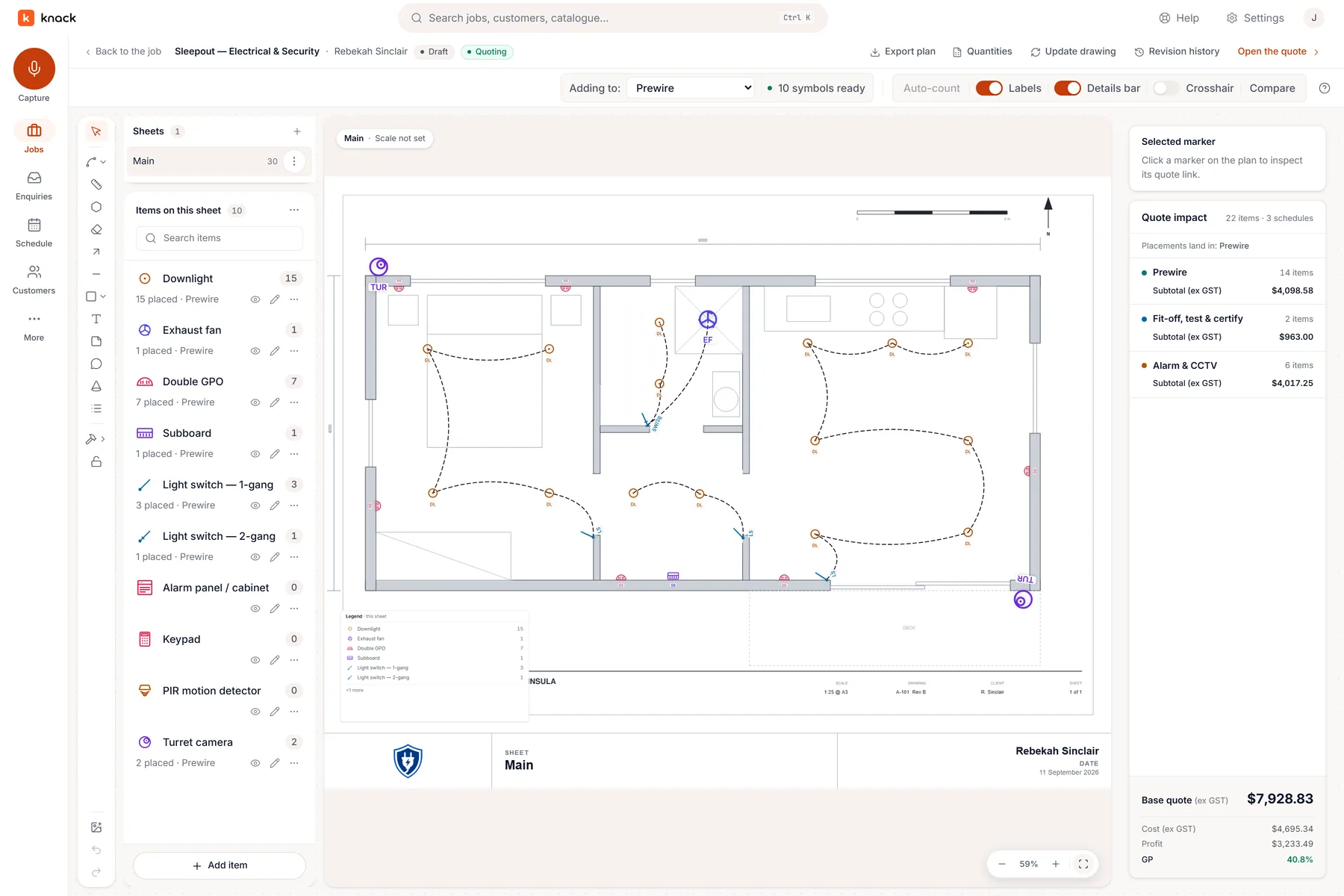
A real job: the sleepout takeoff, 15 downlights counted off the plan.
The quote & the yes
Build it honestly. Present it simply.
Inside Knack the quote carries your cost, markup and margin, line by line. The customer sees one clean page — options to pick, extras to add, and a place to sign.
- Good, better, best on one quote. Choice groups and optional extras let the customer upgrade the switchboard or add the garden circuit without a second visit.
- Changes come back as pins, not phone calls. The customer marks what they want moved on the plan inside the quote link; you see exactly what they mean.
- A recorded, declaration-bound yes. Acceptance happens on the web, against frozen terms and scope — a clean record to invoice against, in your own branding.
- Then the job gets booked. The won job drops into the booking tray — pick a day, assign the crew, and the schedule reads the same on a phone as on a laptop.
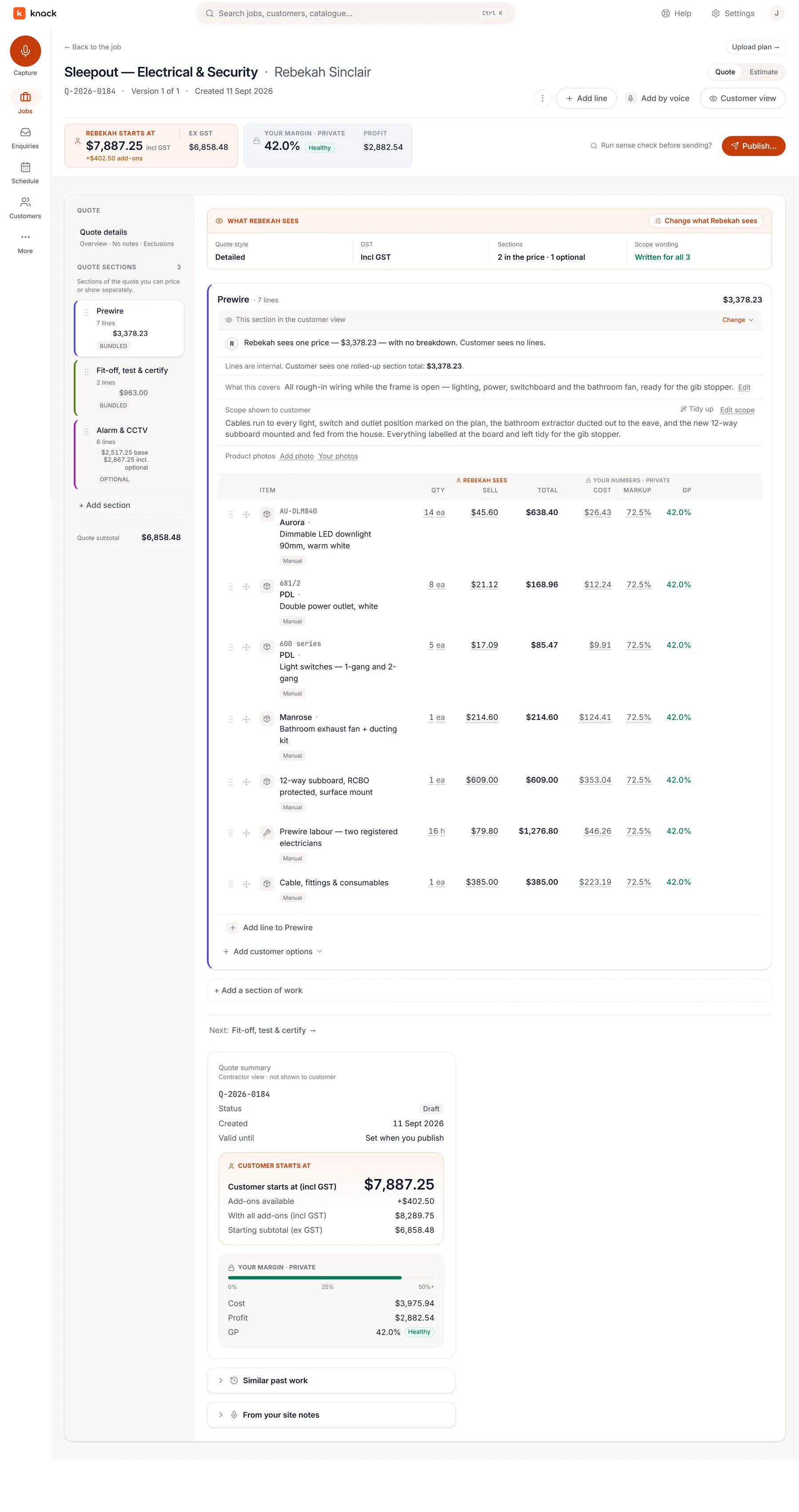
Your build-up on the left. What the customer sees is up to you.
The paperwork
Sign it off before you leave the driveway.
The certificate is a review, not a re-type. Issue the CoC or ESC from the job itself, on the phone — the site, the customer and what it relies on are already in it, and the test results, the declaration and the signature stay yours alone. Filed against the job for seven years. Supplier dockets land on the job by email, so the folder builds itself.
Before the quote
The lead you never replied to costs more than any tool.
Enquiries land in one inbox with a state, an owner and a clock on them — website form, forwarded email, or a note you took on the phone at the top of a ladder. When you quote it, the enquiry becomes the job and the trail stays attached.
Pricing
Priced like a workspace, not a headcount.
Plans from NZ$49 a month for the whole business — no per-user fee, cancel any time. Every plan gets the complete quoting workflow and the enquiries inbox. See the plans →
Fair questions
Straight answers.
Will the guys on the tools actually use it?
That's the reason mobile parity matters. There's no cut-down field app to learn: the schedule, the job and the quote are the same screens they'd see on a laptop, laid out for a phone. And if all they need is to know where they're going, they can subscribe the calendar app they already use — nothing to install at all.
Does it know the switchgear I fit?
Yes. Knack knows the ranges NZ sparkies name: PDL Iconic, Iconic Styl and Essence, the PDL 500, 600 and 56 Series, Vynco Home, Metro, Village and Urban, Legrand Excel Life and Arteor, HPM Excel and Linea, Voltex and Hager Silhouette. It also knows breakers (Resi9, Acti9, NHP), lighting, smoke alarms and EV chargers. Set your usual once, or give a job its own range and colour, and every pick follows it. Nothing moves to another range without you. Use something else? Type the range you use.
Does it work with Xero?
Yes — when a job is accepted it can hand off to Xero as a draft invoice for you to check, or Knack can approve it in your Xero and email it to your customer for you. Knack reads back only that invoice's status, so the job shows whether it's been paid. We're not trying to replace your accountant's software: Knack never chases a payment. Moving across from Fergus? Connect it and bring your Fergus customers straight across, and accepted jobs can push back there as jobs for as long as you still need it.
Is this another job-management system I have to migrate everything into?
There's nothing to migrate. Knack starts where the work actually starts — an enquiry in your inbox — and runs it through quoting to a signed acceptance, then onto a schedule so the won job gets booked and done. What it deliberately doesn't do: debt chasing or a second set of books. Your accounts stay in Xero.
Does Knack do invoicing?
Yes, with Xero, in New Zealand. Once you turn it on, Send invoice on the job approves the invoice in your Xero — the deposit straight after acceptance, the balance when the job's done — and emails it to your customer with your bank details and the job number as the reference. Xero keeps the books and says what's been paid; Knack never chases a payment or keeps a ledger of its own.
More questions answered on the features page →
Bring the next job you have to price.
Thirty days, every plan feature, no credit card. The fastest way to judge Knack is on a rewire you actually have to quote.