You're not slow at quoting. You're typing the same job four times.
You count it on site, type it into a quote that night, write it in the diary when they say yes, and type it all again for the paperwork. Every retype is another evening — and another chance to get a number wrong.
Without Knack the same job, typed four times
On siteTally it on the back of the plantyped ×1
That nightType it into a quote at the kitchen tabletyped ×2
Days laterChase the yes by text, then write it in the diarytyped ×3
After the jobType it all again for the certificate and the invoicetyped ×4
With Knack said once, carried the whole way
On siteTalk it as you walk, count it off the planVoice notes come back as draft scope lines
Same dayThe count seeds the quoteYour cost and margin beside every line
When they're readyThey accept on one linkOptions picked, declaration signed, receipt to both sides
After the yesThe job carries it throughBooking, site forms and handover — and the CoC for electricians
The lead
The enquiry you got back to on Thursday
It went cold while you were on the tools. Miss three a week, win one in three of those, and at $1,900 a job that's roughly $100,000 of work a year you never even quoted.
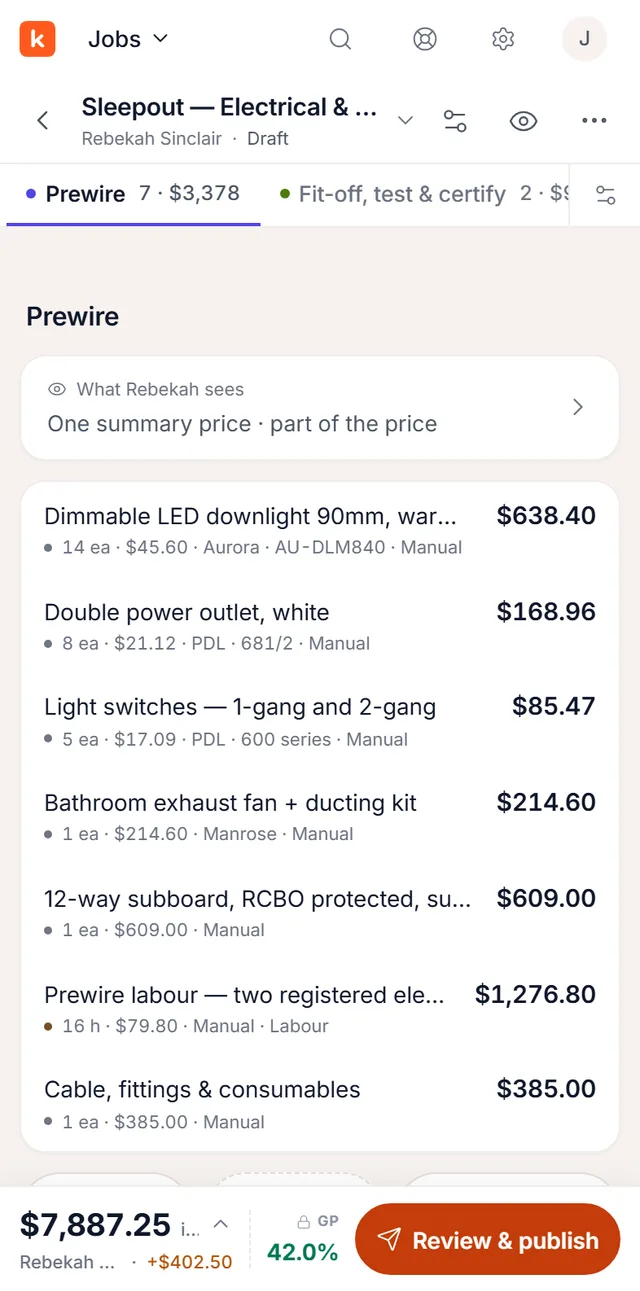
A number that felt right can turn out to be a job you did for nothing. Knack keeps your cost, markup and gross profit beside every line while you price — and the customer sees one clean total.
The walk-through already had everything in it. Say it as you walk, box one symbol and let the plan count the rest — the quote becomes checking, not typing.
“Can we get a double point on this wall, behind the sofa?”
Knack found 5 more · draft
0:47
“…eight double points through the kitchen and living, dimmable downlights right through — count those off the plan — and the board’s got to go to a fifty-one way with the meterbox combined…”
Double power points — kitchen & livingdraft · ×8
LED downlights, dimmable — throughoutdraft · qty off the plan
Downlight 14Double GPO 8Light switch 5Exhaust fan 1Lighting circuits 5
Five more downlights matched to the one you boxed.draft · check it
28 placements on this sheet · quantities flow to the quote once you’re happy with them.
Draft quoteOff this sheet
Downlights × 14$2,240
Double power points × 8$1,080
Light switches × 5$430
Exhaust fan — bathroom$290
Upgrade to 51-way switchboard & combined meterbox voice note$1,900
Rough-in, wiring and connection$2,410
Total$8,350
RCD sub-board — on your last 9 villa rewires, not on this one.$780?
Internal — cost $6,420 · markup 30% · GP 23%customer never sees this
Knack Electrical & Security
2 Matipo Road — electrical prewire
Two extra double points — living+$270
Total incl. selected options · $8,620
Receipt sent to both sides · scope frozen exactly as accepted
01On-site notes
Walk the job. Say what you see.
Room by room, Knack turns your voice notes into draft scope lines — ready to review, edit and price before anything reaches the quote.
0:47
“…eight double points through the kitchen and living, dimmable downlights right through — count those off the plan — and the board’s got to go to a fifty-one way with the meterbox combined…”
Double power points — kitchen & livingdraft · ×8
LED downlights, dimmable — throughoutdraft · qty off the plan
Faster than typing — and nothing forgotten by the time you’re back at the desk.
02Takeoff
A full takeoff engine, in your browser.
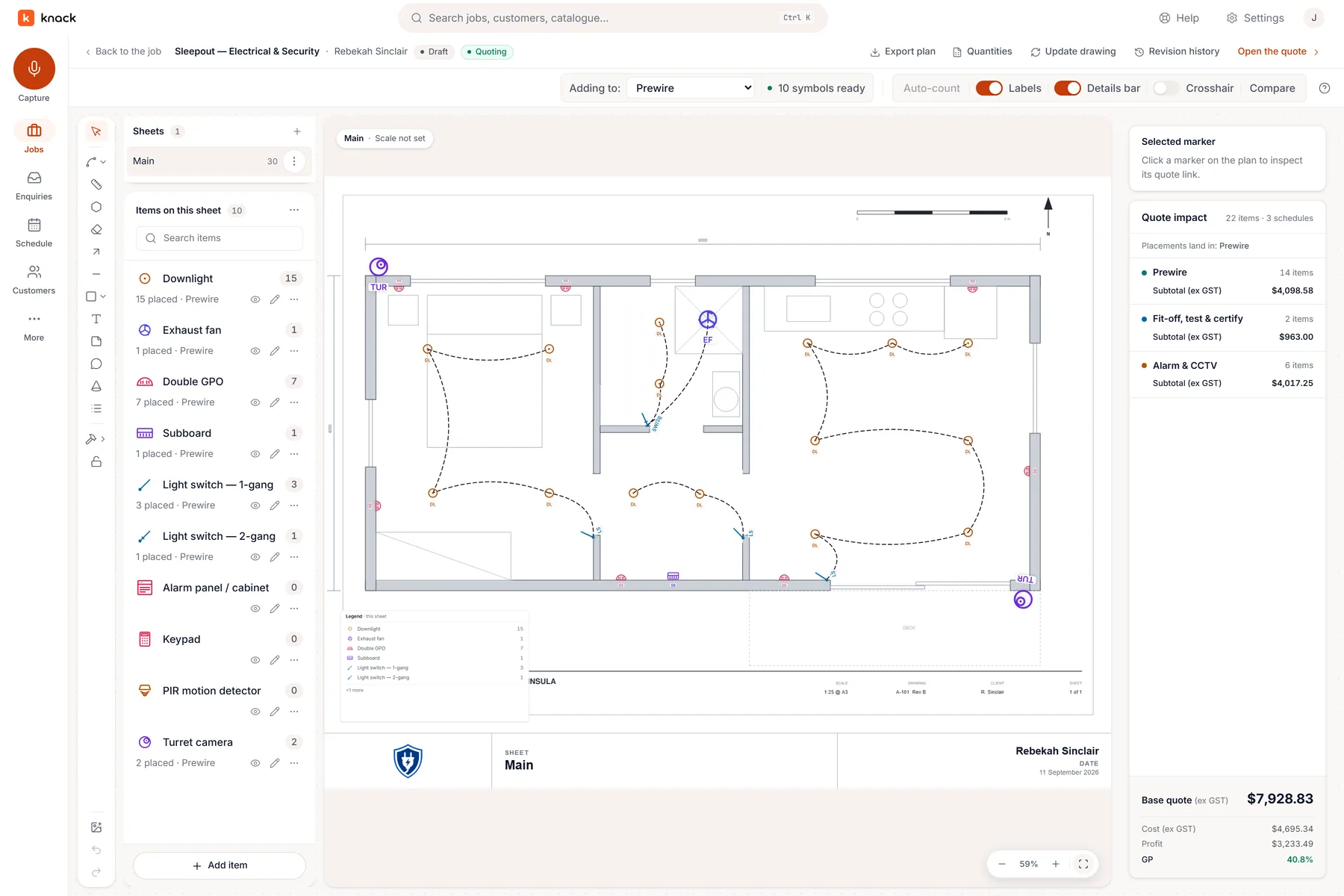
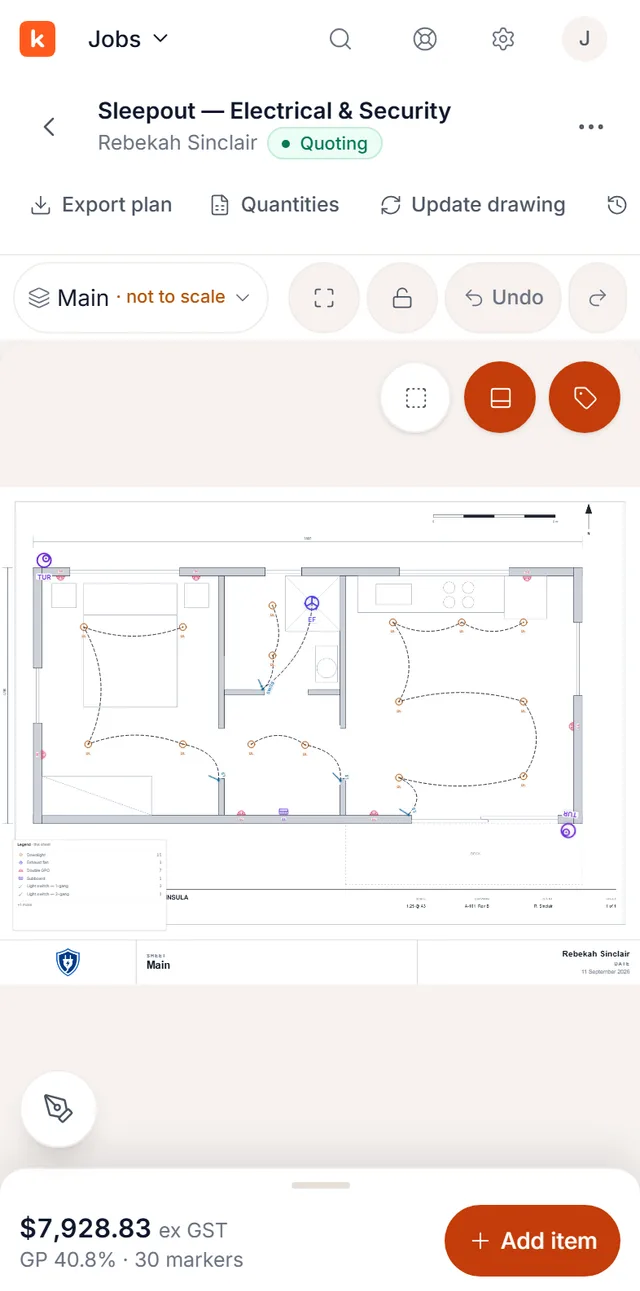
Drop symbols, trace circuits and cable runs, and measure floor areas — build the takeoff up exactly how the job runs, with no desktop software to install. Or drop in the architect’s or consultant’s PDF and box one symbol to auto-count every match on the sheet. Runs price per metre, areas per m², counts by the fitting, and every quantity flows straight into the quote.
Downlight 14Double GPO 8Light switch 5Exhaust fan 1Lighting circuits 5
Five more downlights matched to the one you boxed.draft · check it
28 placements on this sheet · quantities flow to the quote once you’re happy with them.
Your own drawings or the consultant’s — the counting evening you used to lose to a highlighter and a clicker.
03Quote builder
Your capture flows straight into the builder.
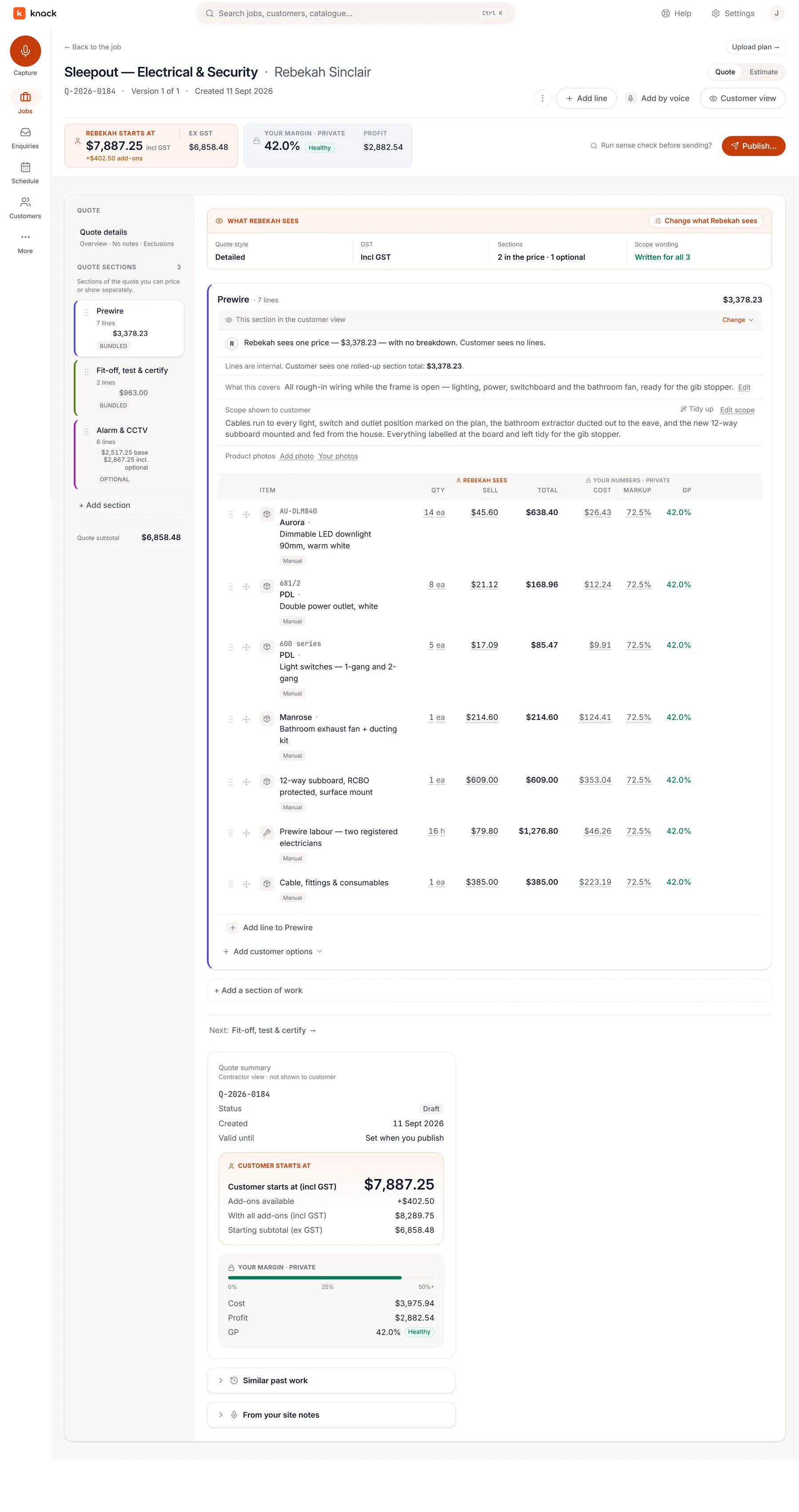
Lines from your notes and the takeoff land in the builder, priced from your price book. Knack checks the draft against the similar jobs you’ve already quoted — and quietly points out the line you’ve put on every other villa rewire but left off this one.
Draft quoteOff this sheet
Downlights × 14$2,240
Double power points × 8$1,080
Light switches × 5$430
Exhaust fan — bathroom$290
Upgrade to 51-way switchboard & combined meterbox voice note$1,900
Rough-in, wiring and connection$2,410
Total$8,350
RCD sub-board — on your last 9 villa rewires, not on this one.$780?
Internal — cost $6,420 · markup 30% · GP 23%customer never sees this
Costs, labour and margin stay internal. The customer sees one clean number.
04Acceptance
Send one link. Get a signed yes.
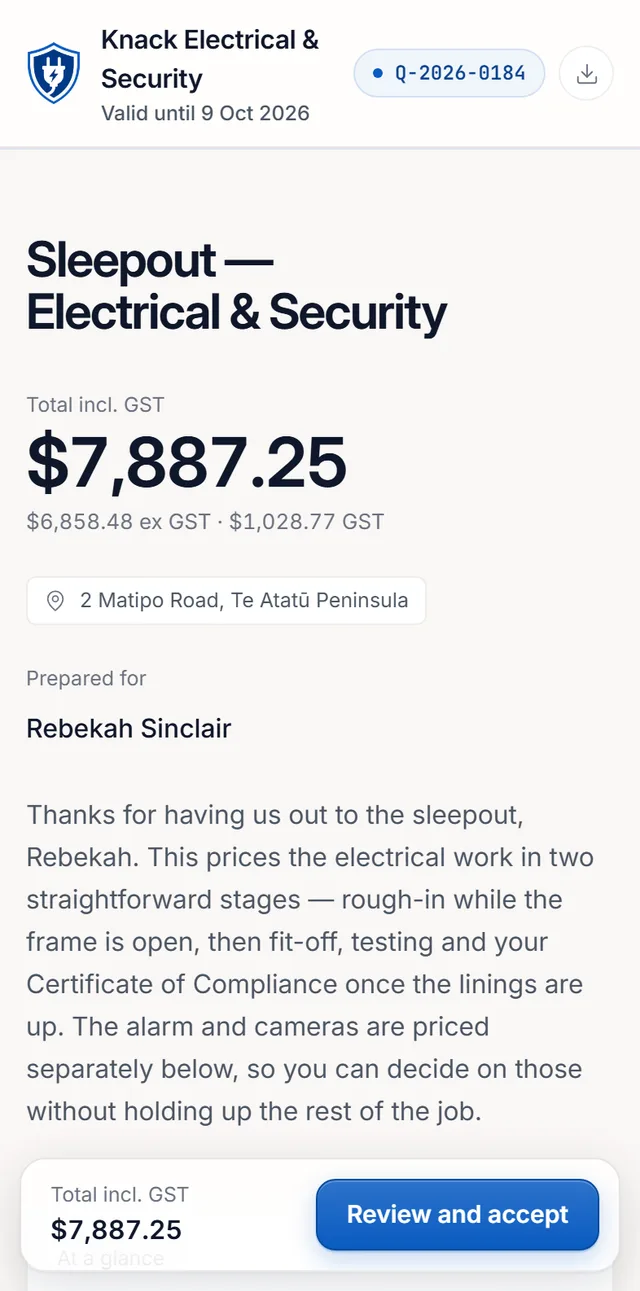
Your customer reads the scope, ticks the extras they want — and watches them light up on the plan as they go. Not quite right? They pin a change request straight on the plan and you send the revision. The moment they accept, the agreed scope is frozen and receipted for both sides.
Knack Electrical & Security
2 Matipo Road — electrical prewire
Two extra double points — living+$270
Total incl. selected options · $8,620
Receipt sent to both sides · scope frozen exactly as accepted
Declaration-bound and recorded exactly as agreed — your answer if scope is ever questioned.
The moment that matters
A quote isn't done when it's sent. It's done when it's accepted.
Most quoting tools stop at the PDF. Knack treats the customer's side as
first-class: a clean web page where they read the scope, choose their
options, and commit — properly.
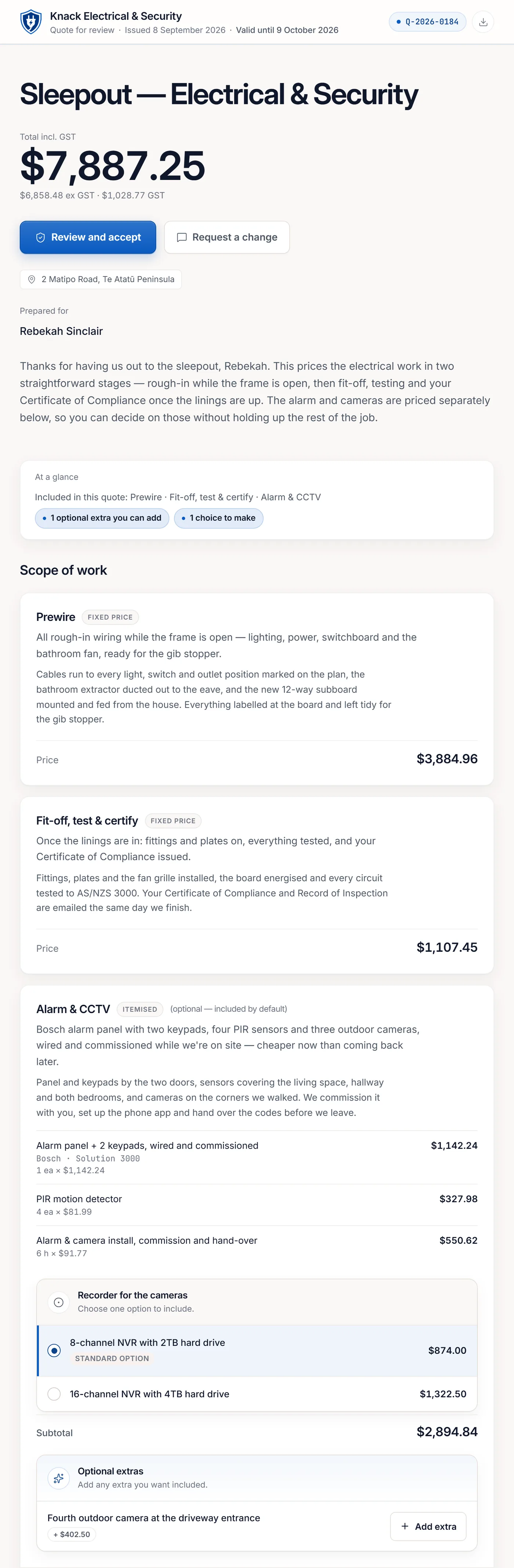
The extras light up on the plan. Tick "outdoor & garage" and the markers for it appear on the drawing, right where the work is. Your customer sees what they're buying, not a line of text.
Options they can pick, prices that follow. Offer a choice — two recorders, an extra camera — and the customer selects right on the quote; the total updates live, and what they picked is what gets recorded.
Priced how you sell it. Itemise where the detail earns trust, bundle a section to one clean price where it doesn't — your internal build-up stays yours.
They can explore, not just skim. Customers open the plan and photos right in the quote to see exactly what's included.
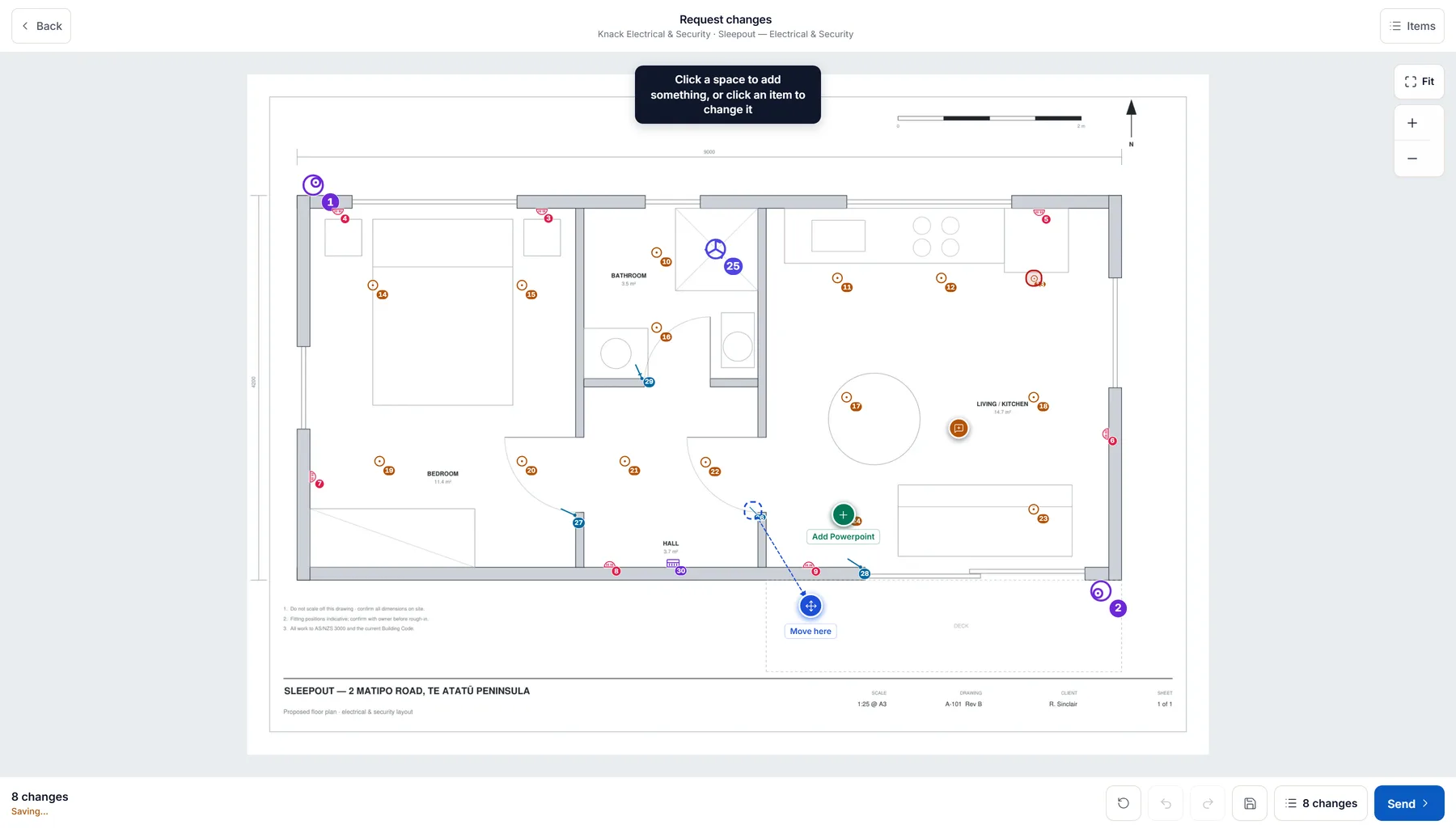
Changes come back as pins, not phone calls. If something's not right, your customer drops a pin on the plan exactly where they mean and asks in their own words. It lands back in your builder as a clear request — you send the revision, one live link the whole way.
Declaration-bound acceptance. Your customer affirms the terms explicitly — no ambiguous "looks good" texts.
An immutable record. Scope, selected options, terms, and totals are frozen exactly as accepted, with a receipt for both sides.
Your brand, not ours. The customer sees your business front and centre on every page, email, and PDF.
knackapp.co.nz/q/…
The actual customer page for the demo quote — one link, readable on anything, your brand at the top. The customer picks their options; the moment they accept, scope, selections and terms are frozen exactly as agreed.
Two trades, two toolkits
What do you install?
Pick as many as apply — plenty of people do more than one, and the page follows your selection rather than making you choose. Electrical and security each ship with a real configuration: symbols, starter catalogue, defaults.
Do all three? Select all three — nothing here is either/or. Your pick is remembered on this device.
For electricians
Price a rewire off the plan, not off a guess.
Mark up the consultant's PDF, or draw the plan yourself — walls, doors and fittings on a blank sheet. Symbols, cable runs and areas count themselves, to scale, in the browser. The takeoff seeds the quote lines, and the quote carries your real cost, markup and margin behind the customer's price.
Auto-count off the drawing. Box one downlight and Knack finds the rest of them on the sheet — fifteen downlights becomes fifteen counted placements, not a tally on the back of your hand.
A point, not a part. Those fifteen downlights bring their cable, their sundries and their labour with them, at your rates — so does a GPO, a switch, a smoke or an isolator. See what one placement seeds →
Talk the job as you walk it. Voice notes come back as draft scope lines, ready for you to check and price before you reach the van.
The certificate starts from the job. Issue the CoC or ESC from the job itself, opened with the site, the customer and the work already in it — you check it rather than remember it.
Quotes in NZD, incl. GST. New Zealand product, New Zealand paperwork, no currency gymnastics.
knackapp.co.nz — takeoff
A real job: the sleepout takeoff, 15 downlights counted off the plan.
For security installers
Sell the coverage, not a list of cameras.
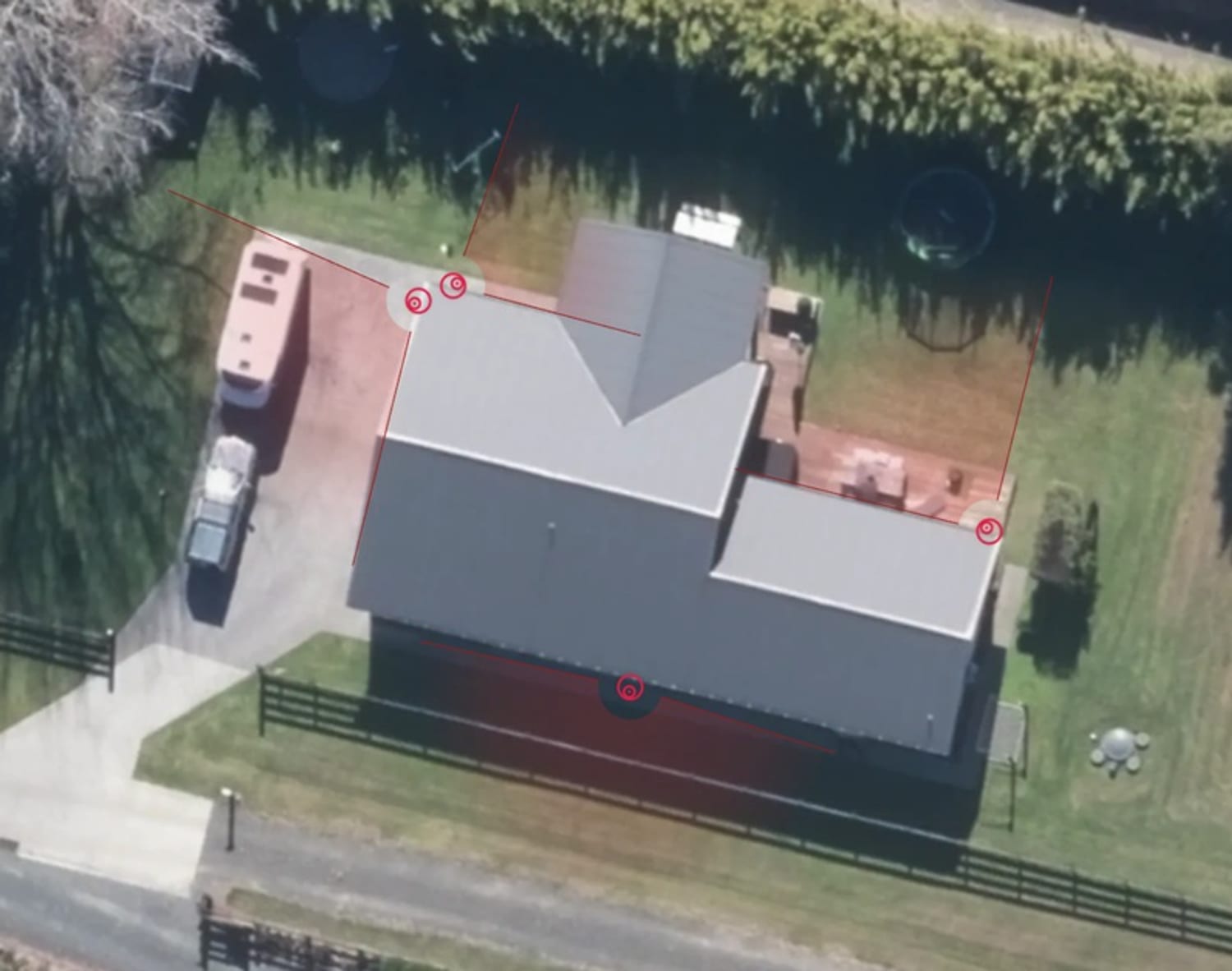
Pull the real aerial of the property, drop each camera where it goes, and show the customer exactly what the lens sees. The coverage plan travels with the quote, so the conversation is about blind spots instead of model numbers.
Real aerial imagery, not a sketch. Mark positions on the actual property and the customer recognises their own driveway.
The brands you actually fit. Ajax, Hikvision, HiLook, Dahua, VIGI, Uniview, Hanwha, Milesight, Paradox, Paradox M25, Arrowhead, Inner Range — switch on the lines you install and their products are on the palette, drawing their own published coverage. See how the packs work →
PoE and recorder capacity checked. Channel count, power budget and storage add up while you're still placing cameras, so the eight-camera job doesn't arrive with a six-channel NVR. Run the sense check before you send and it reads the quote too — the recorder with no drive, the cameras with nothing to record to.
Servicing that comes back around. Note the return service when the install wraps, and the annual alarm check lands back in the tray when it's due — not when the customer remembers.
Good, better, best on one quote. Choice groups and optional extras let the customer pick a recorder or add a camera without a second visit.
Five cameras marked on a real property. Aerial imagery: LINZ.
For solar installers
From first enquiry to commissioned handover.
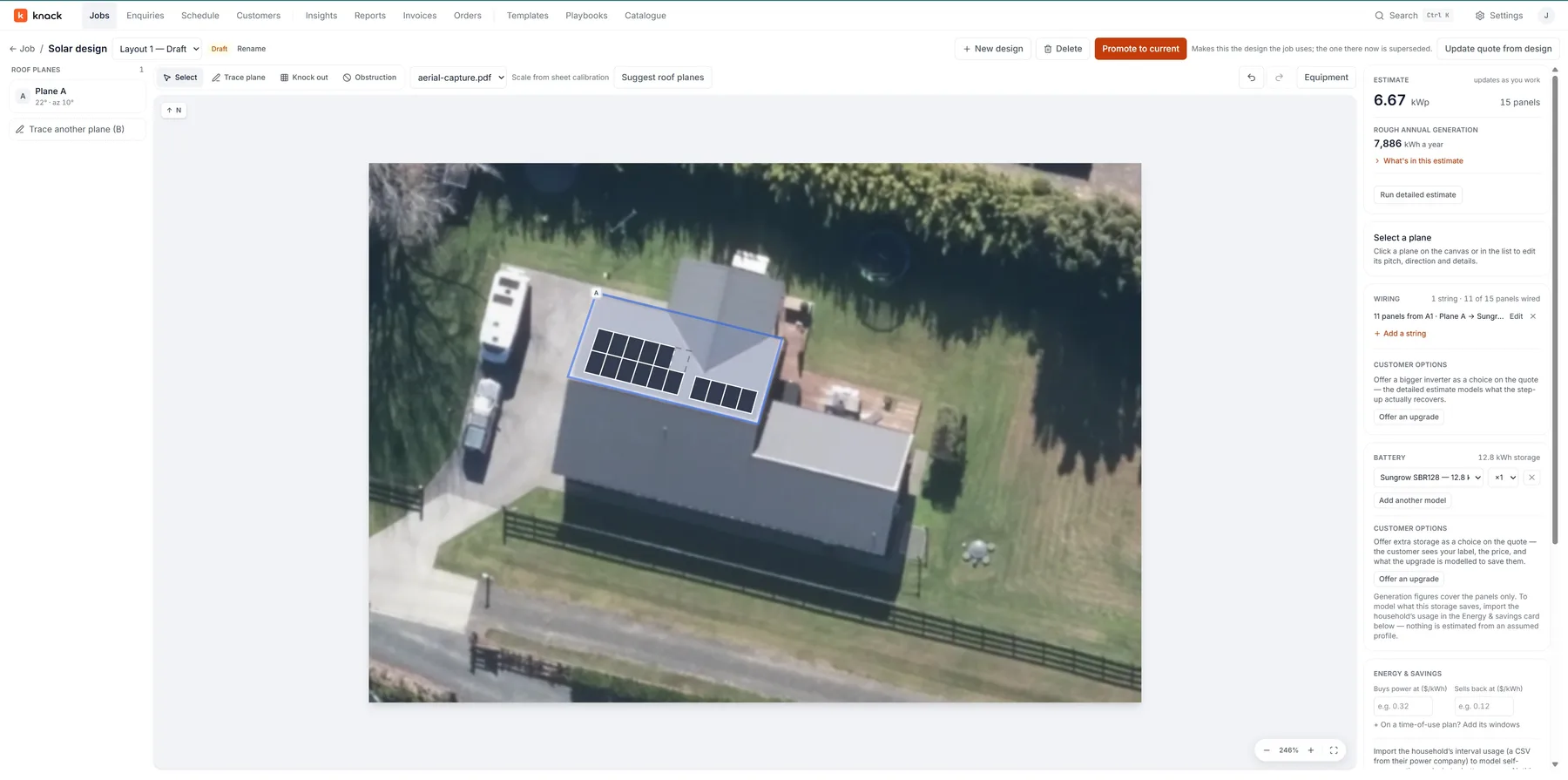
Knack Solar takes an ordinary residential solar-and-battery job all the way through without leaving the product or entering the same information twice. The roof design drives the system size, the yield, the equipment, the materials, the price and the compliance evidence — change the layout and everything downstream follows it.
Design on the real roof. Roof planes from aerial imagery, panels placed with setbacks and shading, strings and MPPT checked as you go. Where the imagery is thin, drawing the roof by hand is a first-class path, not a fallback.
Yield and payback you can defend. Generation, self-consumption, battery dispatch and bill impact — every customer-facing number recorded against the tariff, usage profile and assumptions it came from.
The design writes the quote. Racking, balance of system, upgrades and labour come off the actual design, priced from your own price book.
Evidence, then handover. Install pack, serial capture, staged photo evidence and test readings roll up into the handover pack at the end.
Knack Solar is switched on account by account while we build it alongside working installers. Solar installers can quote, send and win work on the main product today — ask us and we'll tell you straight where the designer is up to.
knackapp.co.nz — solar designer
One roof plane traced, panels placed, and the system size, yield, wiring and battery follow it — all before anyone has typed a price.
No drawings? Draw them.
Build the plan yourself — walls, doors, windows and fittings.
Plenty of the jobs worth quoting turn up with no drawings at all. Start a blank sheet, say how wide the building is, and draw it: walls that snap square and take a typed length, doors and windows cut into those walls, and seventy-six ready-made objects stamped at real size. Then run the takeoff over it exactly like any other plan.
Sleepout — 24 Bella StreetSheet 01 · started blank · 10.00 m wideWall tool
SketchK
RoomR
WallW
OpeningD
FixtureF
RemoveX
A sleepout drawn on a blank sheet: 140 mm exterior walls and 90 mm partitions, doors and windows cut into them at the widths they really come in, and the fittings stamped at the sizes they really are — no captions, because the drawing is the name. Each room measures its own floor area to the inside face of its walls, each wall says how long it is, and the store cupboard’s return is still in flight, about to land at exactly the 850 mm typed in. The same tools work on top of an uploaded PDF or an aerial, so you can draw the sleepout the architect’s drawing doesn’t have on it yet.
Walls
Click, click, click — square
Segments lock square and snap to what you’ve already drawn; type a number and one lands at exactly that length. Walls carry a real thickness, and a wall two rooms share is only ever counted once.
Openings
Doors and windows cut the wall
Hinged, sliding, fixed or a garage door. An opening leaves a gap in the wall instead of sitting on top of it, draws its own swing, slides along the wall to move — and goes with the wall when you move that.
Objects
Seventy-six things, ready to stamp
Baths, showers, vanities, bench runs, wardrobes, beds, switchboards, meter boxes, heat pumps, decks, fences, car spaces, server racks. Ten groups, every one at its real-world size.
And it counts
The drawing feeds the quote
Name a room and it measures its own floor area, to the inside face of the walls. Link a wall to your per-metre items and a room to your per-m² items, and the takeoff follows the drawing like any other plan.
The coverage tool
Show them what the camera sees.
A camera list is a shopping receipt. A coverage plan is a proposal. Knack pulls the real aerial view of the address, you place the cameras, and the customer sees their own property with the blind spots closed.
Aerial imagery sourced from LINZ.
Place cameras on the real property.Aerial imagery for the address, not a generic floor plan. Drop a position, set the direction, adjust the field of view.
Capacity checked as you design.Channels, PoE budget and recorder storage add up while you place, so the eight-camera job doesn't arrive with a six-channel NVR.
Every camera is a quote line.The plan feeds the pricing, so the drawing and the price never drift apart.
It helps close the deal.Customers approve what they can see. The coverage plan sits inside the quote link they open on the couch.
Product packs & points
It already knows the gear you fit.
Switch on the brands you install and their products land on your palette — each symbol drawing that product’s own published field of view. Place one and you don’t get a lonely camera line. You get the point: the bracket, the box, the cable and the labour that always went with it.
Ajax Systems
Hikvision
HiLook
Dahua
TP‑Link VIGI
Uniview
Hanwha Vision
Milesight
Paradox
Paradox M25
Arrowhead
Inner Range
Bullet camera point6 placed on the planseeds
Bullet camera unit6
Wall bracket / junction box6
Cat6, camera‑to‑recorder allowance150 m
RJ45 terminations & accessories6
Mount, cable, terminate, aim, commission6
Your parts, your cable allowance, your rate — confirmed once in settings, then every placement follows the count. Change a line by hand and it stays changed.
Sense check · only when you ask for it
No drive alongside the recorder. This quote prices 1 recorder hardware and no separate drive. Most ship bare — worth checking whether the drive comes in the box or belongs on the quote.
Three fewer things to remember.
The pack knows the product. Twelve manufacturer lines — Ajax, Hikvision, HiLook, Dahua, VIGI, Uniview, Hanwha, Milesight, Paradox, Paradox M25, Arrowhead, Inner Range — and 379 products you can place. A turret draws its lens’ published field of view; an Ajax detector draws its stated detection pattern. Every cone stays yours to drag.
The point knows its parts. Camera points, PIR, door contacts, keypads, downlights, GPOs, switches, smokes and isolators come as ready-made points. One placement seeds the lot, the count follows the plan, and the whole build-up collapses to a single price for the customer.
The check reads the quote, not just the plan. Run the sense check before you send and it looks for the companion nobody prices: a recorder with no drive, cameras with nothing to record to and nothing feeding them, an alarm panel with no standby battery or comms path. It goes quiet the moment your quote already answers it.
The packs carry the products and their published figures — never your prices, never your minutes. Starter rows are round numbers to overwrite from your own list, and nothing reaches a quote until you’ve confirmed your rates. A coverage cone is a drawing aid for the conversation, not a detection or compliance guarantee.
Enquiries
The lead you never replied to was worth more than the job you did.
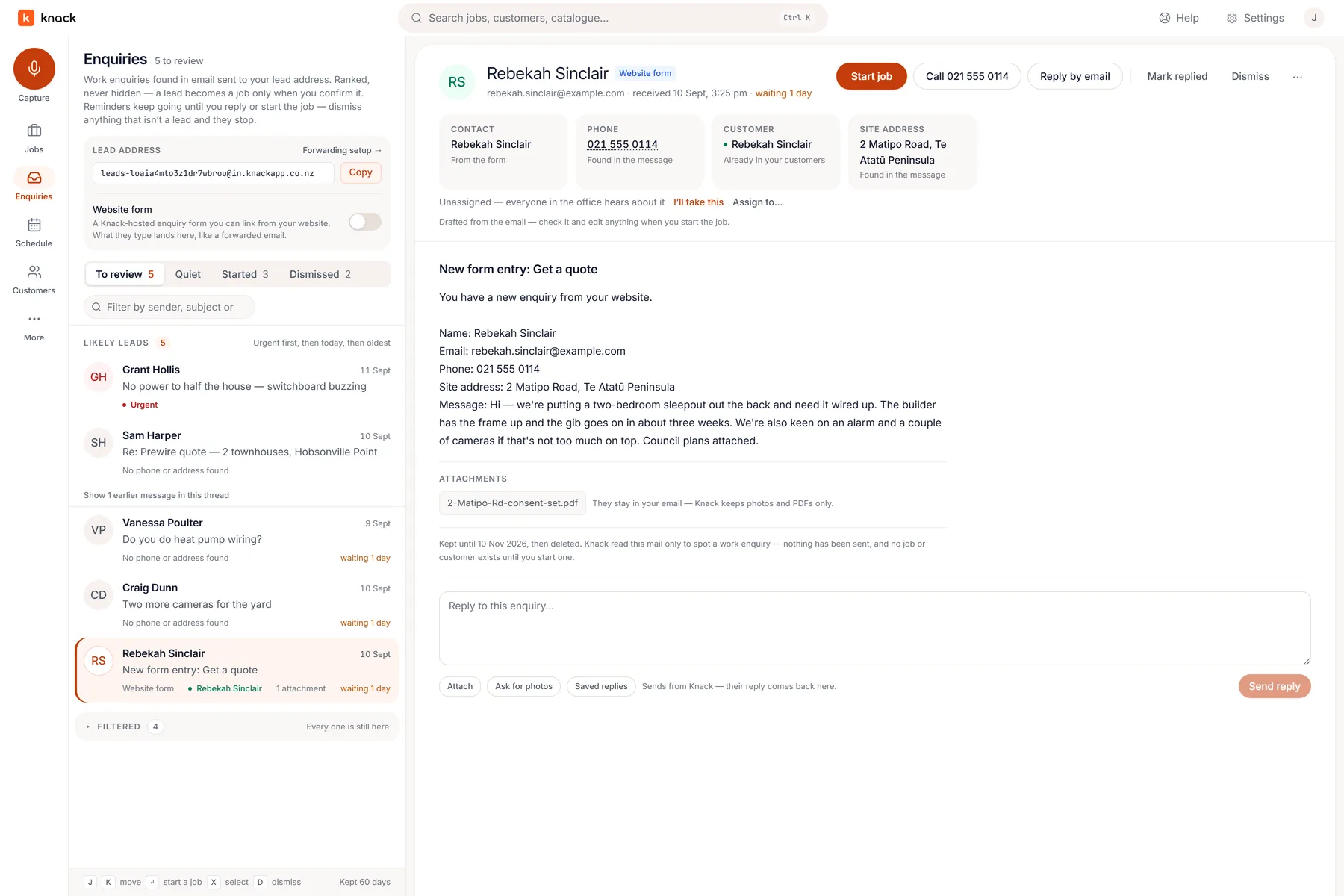
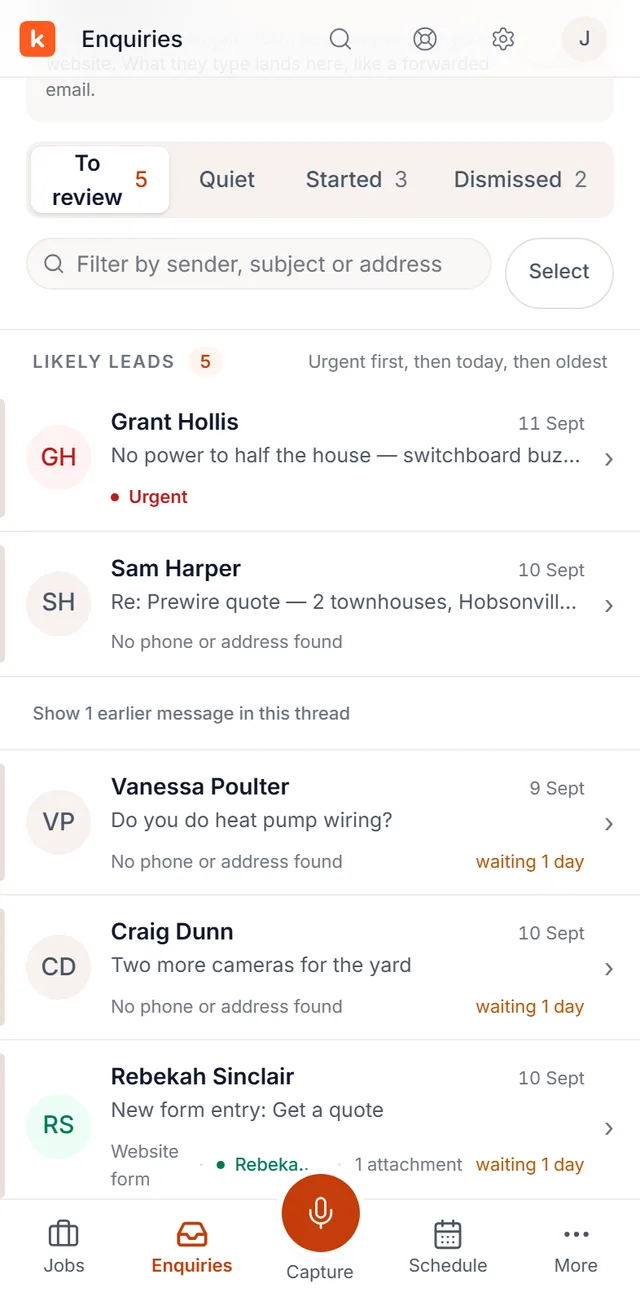
Enquiries land in one inbox with a state, an owner and a clock on them. Nothing sits unanswered because it slipped below the fold of a phone. When you quote it, the enquiry becomes the job, and the trail stays attached.
3×Miss three enquiries a week and you'd have won maybe one in three of them. At $1,900 a job that's roughly $100,000 of work a year you never quoted. Not lost to a competitor on price — lost because nobody got back to them.
One inbox for every channel. Website form, forwarded email, or a note you took on the phone at the top of a ladder.
A clock on every enquiry. You can see what's been waiting two days, because that's the one the customer remembers.
Reply without leaving Knack. Answer the enquiry from the inbox — attachments and all — and the whole conversation stays on the record.
Straight into a quote. Press Start job and the customer, address and notes are already filled in.
knackapp.co.nz — enquiries
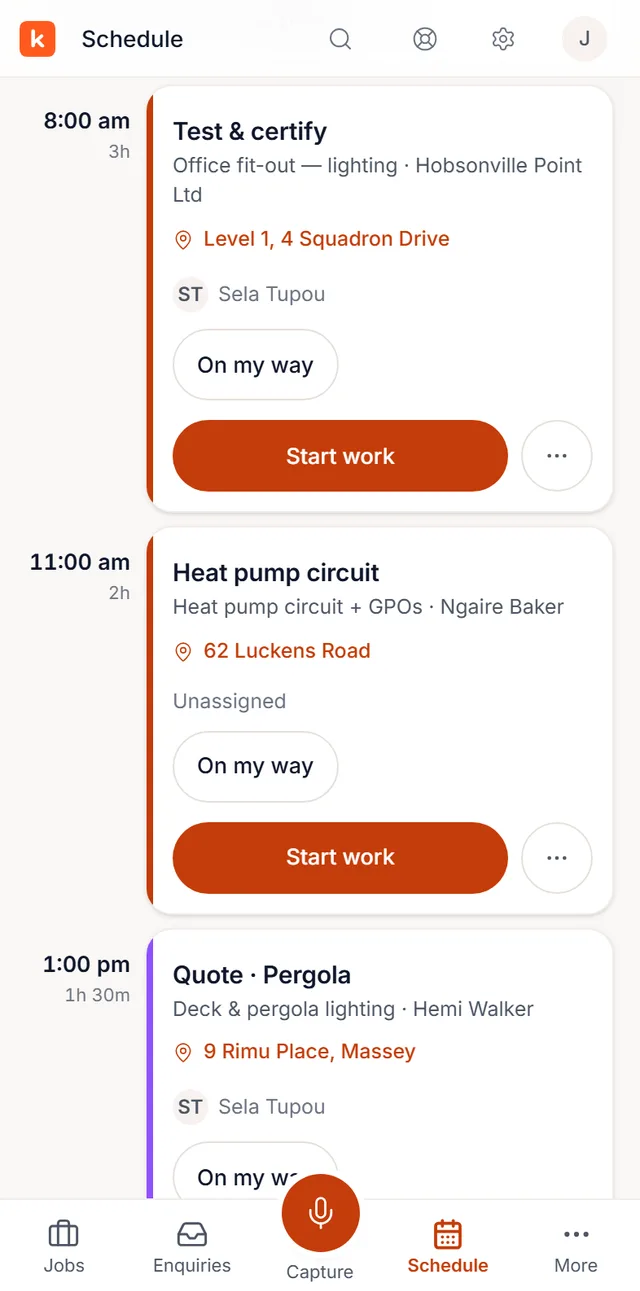
Forward your inbox and Knack picks out the work — ranked urgent first, with the sender, phone number and site address already found in the message.
Jobs, scheduling & the phone
The same product, in your hand.
Not a cut-down companion app. Knack is on iPhone and Android, and the pipeline, the schedule, the visit and the quote all work there, because that's where the work actually happens.
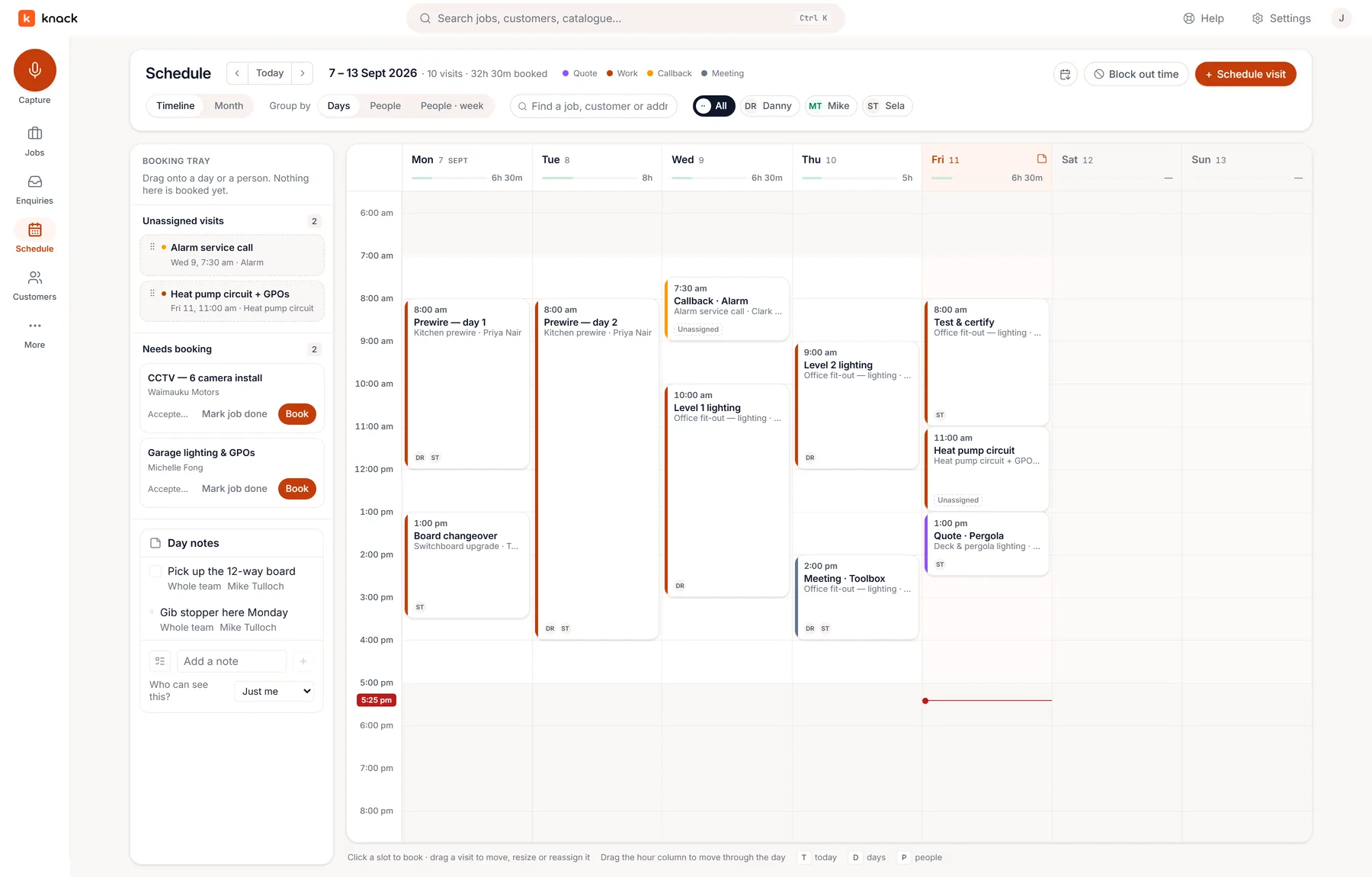
Accepted work lands in the booking tray. Drag it onto a day, hand it to a crew, and Monday morning answers itself.
9:41
EnquiriesTakeoffQuoteSchedule
One product, one login. The app isn’t a companion to keep in sync — it’s the same Knack, laid out for a smaller screen.
Book from the pipeline
Every job from first look to signed yes — what needs action today, what's waiting on a decision, what you've won this month. Won work waits in a tray until you drop it on a day and a crew.
Recurring servicing
Note the return service when a job wraps and the annual alarm check comes back to the tray when it's due, not when the customer remembers.
A feed the crew reads
Your crew subscribes the calendar app they already use, and their visits show up there. Nothing new to install.
Full parity on the phone
Quote, take off, reschedule, sign off — in the app for iPhone and Android. The same screens you'd see on a laptop, laid out for a small one.
Paperwork
Sign it off before you leave the driveway.
The paper that follows every job — the certificate at the end of it, and the supplier dockets that say whether it made money — handled where the job already lives.
Certificates
The certificate is a review, not a re-type
Issue a Certificate of Compliance or an Electrical Safety Certificate from the job itself — on the phone, standing in the room you just wired. The job already knows the site, the customer, the work and what the certificate relies on, so the form opens with that in it and you check it rather than remember it.
The first time you issue, the form takes your EWRB number, licence class and signature inline and never asks again. The number is allocated when you submit, the PDF is filed against the job for seven years and mirrored into your own Google Drive, and it reaches the customer when you send it — not on submit. Typo? The fix supersedes the revision and keeps the trail.
Filled in from the job
Site address and customer
A starting description of the work
What it relies on, and where that lives
Never filled in for you
Test results and dates of work
Supply system and risk category
The declaration and your signature
No AI goes near this form — not drafting it, not suggesting a value, not tidying the legal wording. You are the licensed person signing, and Knack never decides whether the work passes.
Your own copy
The certificates stay yours
Every certificate you issue is filed against the job and kept for seven years — the period the law asks of the person who signed it. Connect your own Google Drive and a copy lands there too, filed by year and type under the number you issued it with.
Kept seven years against the job that earned it
Mirrored into a Drive folder you own
Still yours if you ever leave
Connecting Drive is optional, and one press in Settings. Knack can only see the files it puts there — never anything else in your Drive.
Supplier documents
Every invoice against the job that earned it
Supplier invoices and packing slips attach to the job, so material cost sits next to the price you quoted. You find out whether a job made money while you can still do something about it.
Docs land on the job, not in the ute
Quoted price against real material cost
Purchase orders raised from the same place
Costs, never payables. Knack shows you what a job cost; what’s owing and paid stays in your accounting system.
Straight from the product
See it for real.
These are real product screenshots of Knack working one demo job — a sleepout wired and alarmed — from the first email to the booked-in work. Click any screen to see it full size.
Sun, 4:12 pmThe enquiry lands
MondayPlans marked up, quote out
Tue, 7:42 pmAccepted online
Mon, 8:00 amCrew on site
The revision loop
Changes come back as pins, not phone calls.
Your customer taps the plan itself — move this switch, add a double GPO, a note about the TV wall in their own words. It lands back with you as a clear change list to price, on the same live link.
knackapp.co.nz/q/…
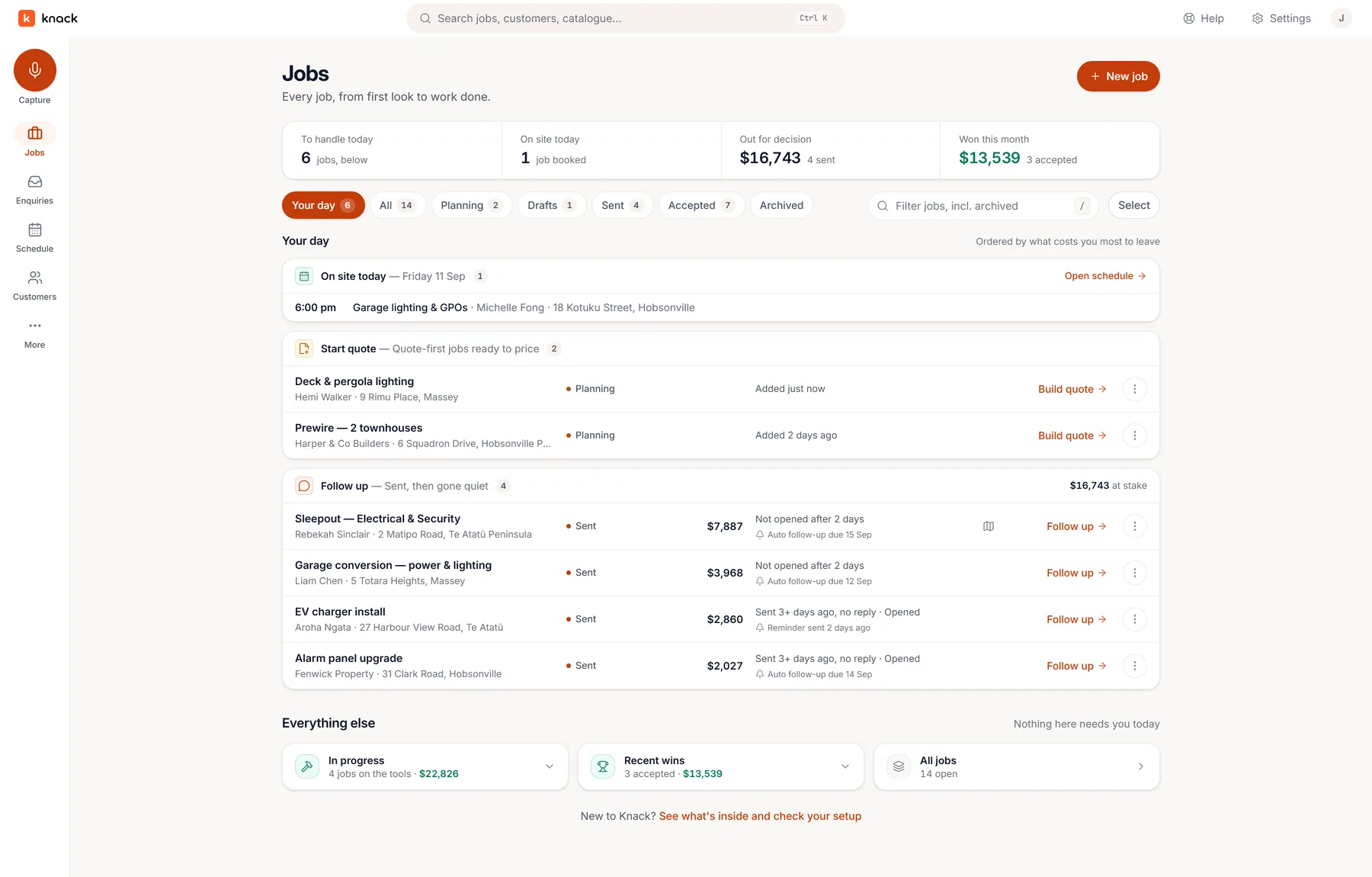
Jobs
Nothing sent goes quiet for long.
Sent quotes chase themselves with polite follow-ups that stop the moment there's an answer, and you can see when the customer opened it. The month's accepted total is on the same board.
knackapp.co.nz
Bring the next job you have to price. If Knack doesn't win you that quote, it cost you nothing.
There's good job-management software out there, and most of it handles the job itself well — scheduling it, tracking it, invoicing it. Knack is built around the part that decides whether you win the work and whether it makes money: the plan, the takeoff and the quote. Then it carries that same job through to the certificate without anyone typing it in twice.
Quoting
The quote starts from the drawing
Symbols you place on the plan become priced lines. Every number you send traces back to something on the drawing, not a tally you did in your head.
Plans
No plan? Draw one.
Mark up the architect's PDF, pull the aerial, or draw the building from scratch — walls, doors, windows and fittings. All three land in the same takeoff.
Money
The margin is on screen while you price it
Cost, markup and gross profit sit beside every line and every section as you build. The copy the customer reads carries one clean number and none of that.
The customer
Acceptance is a record, not a text message
They pick their options, sign a declaration, and what they agreed to is frozen exactly as accepted — with a receipt for both sides.
On site
Site paperwork is a form, not a photo of a clipboard
Test records, commissioning sheets, hazard checks and handovers — filled on the phone, filed on the job as a PDF, signable by the customer. Mark one required and the job can't go out for sign-off until it's been filled in.
Compliance
The certificate knows the job
The evidence is collected as you work, so issuing the CoC is a review of the job you did rather than a re-type in another app.
You don't have to move everything
Leave your current system running. Put the next job you have to price through Knack and judge it on that one job.
Keep your accounting where it is
Accepted jobs go to Xero as draft invoices — or, if you choose, Knack approves the invoice in your Xero and emails it to your customer. Still on Fergus while you move across? They can land there as jobs too. Xero keeps the books; Knack never chases a payment.
Your trade is already configured
Electrical and security each ship with their own symbols, palette and starter catalogue — plus twelve manufacturer product lines you can switch on. It knows the switchgear, camera and access ranges you name, too, so every pick follows the one you fit. There's no blank canvas to fill in first.
The rest of the toolkit
There's a lot more where that came from.
Everything between the first email and the finished job — the full kit that gets a quote out fast, accepted cleanly, and booked in.
Enquiries, caught & rankedLeads from your inbox, sorted
Jobs & schedulingBook the won work, run the crew
Auto-count off the planBox one symbol, get the rest
Aerial CCTV coverageMap camera views on a real aerial
Your brands, every pickSwitchgear to cameras, in your range
Points, not partsOne placement seeds the whole point
Voice-note captureSay it once on site
Price book & supplier listsYour catalogue, kept current
Schedules, tiers & extrasLet the customer choose
Read trackingKnow when they've opened it
Sense check before you sendReads the plan and the quote
Follow-ups, handledGentle nudges that auto-stop
Win & loss insightsYour win rate, and where the work came from
Forms filled on siteTest records and handovers, as PDFs
The job sheetWhat's theirs, without ringing the office
Ask for a reviewOne email once they've signed it off
Knack's AI is quick with a starting point — scope from a voice note, lines
from a plan, prices from your history. But nothing reaches your customer
until you've looked at it. It's your name on the quote. And for the shop
fit-out you'd rather work up with Claude or ChatGPT, Knack packs your catalogue
for the session and takes the reply back as a draft quote — you carry the file,
Knack sends nothing. See the round trip →
Or connect it live: your AI reads the job, opens the drawings, searches your
catalogue and writes the draft into Knack while you watch — every tool it
touches named on screen as it happens. Watch a session build a quote →
Always a draft
AI-generated scope and pricing are clearly marked and stay editable until you've reviewed them yourself.
No auto-send
Knack never sends your quote on your behalf. Every quote goes out because you pressed Send — the receipt on acceptance and any follow-ups you switch on are the only automatic emails.
Traceable lines
Every quote line shows where it came from — the plan, a voice note, or your catalogue — so you can check its working.
Questions
Fair questions, straight answers.
What do I actually get in the free trial?
Thirty days, no credit card, and the whole product at the Pro level —
capture, takeoff, auto-count, the builder, sending, real customer
acceptance, plus scheduling, job costs and the enquiries inbox. It
includes 60 voice captures and 180 minutes of recording across the trial.
Nothing on any plan is held back during the trial. (Solar design is
early access, switched on account by account — ask us.)
Afterwards, plans start at NZ$49 a month: every plan keeps the
complete quoting workflow and the enquiries inbox; Pro adds
running the job — scheduling, job costs and the Xero handoff.
The honest way to judge it is to put one real quote through it.
Is my trade supported?
Straight answer: Knack is aimed at electricians and
security / CCTV installers today. Those are the two trades we
ship ready-made symbol libraries and starter price-book catalogues for, and
they're the jobs the takeoff is tuned around. Solar is in early
access and switched on account by account while we build it alongside working
installers. Everything else — voice capture,
the price book, the builder, sending, acceptance — is trade-agnostic, so
another trade can absolutely use it by building its own catalogue and symbols
first. We'd rather tell you that up front than have you sign up expecting a
plumbing palette that isn't there yet. More trades are coming; ask us where
yours sits.
Does it know the brands I fit?
Twelve of them, on the security side: Ajax, Hikvision,
HiLook, Dahua, TP‑Link VIGI, Uniview,
Hanwha Vision, Milesight, Paradox,
Paradox M25, Arrowhead and Inner Range.
Tick the ones you install and their products appear on your takeoff palette, each
one drawing that product's published field of view or detection pattern, each one
bound to a starter price-book row. The starter prices are round numbers to
overwrite from your own supplier list — Knack never claims to know what you pay.
Don't see yours? Everything still works with your own catalogue and symbols; tell
us which line you fit and it goes on the list.
Will the guys on the tools actually use it?
Knack is on the App Store and Google Play, so if your crew want an icon on
the home screen they can have one. But the reason it works on site is
parity, not the download: there's no cut-down field app to learn — the
schedule, the job and the quote are the same screens they'd see on a laptop,
laid out for a phone. And if all they need is to know where they're going,
they can subscribe the calendar app they already use, and install nothing
at all.
Does it work with Xero?
Yes — when a job is accepted it can hand off to Xero as a draft invoice for you to
check, or Knack can approve it in your Xero and email it to your customer for you.
Knack reads back only that invoice's status, so the job shows whether it's been
paid. We're not trying to replace your accountant's software: Knack never chases a
payment. Moving across from Fergus? Connect it
and bring your Fergus customers straight across, and accepted jobs can push
back there as jobs for as long as you still need it.
Is this another job-management system I have to migrate everything into?
There's nothing to migrate. Knack starts where the work actually starts — an enquiry in
your inbox — and runs it through quoting to a signed acceptance, then onto a schedule so
the won job gets booked and done. What it deliberately doesn't do: debt chasing
or a second set of books. Your accounts stay in Xero.
Does Knack do invoicing?
Yes, with Xero, in New Zealand. Once you turn it on, Send invoice on the job approves
the invoice in your Xero — the deposit straight after acceptance, the balance when
the job's done — and emails it to your customer with your bank details and the job
number as the reference. Xero keeps the books and says what's been paid; Knack never
chases a payment or keeps a ledger of its own.
More questions — trade support, what your customer sees, how the AI stays in its lane?
Read the full FAQ →
Win the work before you're back in the van.
Thirty days, every plan feature, no credit card. Bring the next job you have to price — that's the only way to know.