
The complete toolkit
Every tool for
winning the work.
From the first enquiry in your inbox to a signed, recorded yes — and the crew booked in after it. Here's everything Knack gives you to quote faster and win more. All of it is in the free trial, nothing held back to make you upgrade.
- Built in New Zealand
- Your quotes in NZD, incl. GST
- No card to start
The toolkit
One job, done properly.
Knack runs from the first enquiry to a signed acceptance — then follows the won job through to booked, certified and done. Nineteen tools, no filler.
Voice-note capture
Say it once on site instead of typing it twice at home. Knack drafts scope from your notes; you review every line before it goes anywhere.
Auto-count off the drawing
Box one symbol on a consultant's plan and Knack finds the rest of them for you, each one a candidate you accept or reject. The tender that used to eat a Sunday.
Plan markup & takeoff
Drop symbols, trace circuits, measure cable runs and floor areas right in the browser. Runs price per metre, areas per m², and every quantity flows into the quote.
Brand product packs
Twelve manufacturer lines on the security side — Ajax, Hikvision, HiLook, Dahua, VIGI, Uniview, Hanwha, Milesight, Paradox, Paradox M25, Arrowhead, Inner Range. Switch on the ones you fit and their products are on your palette, drawing their own published coverage.
Points, not parts
A placed camera or downlight seeds the whole point — the unit, the bracket or box, the cable allowance, the terminations and the labour — at rates you confirm once. The customer still sees one price.
Price book & supplier lists
Your own curated catalogue on top, your supplier's bulk price list underneath. Re-import and Knack shows you what moved — you decide what to accept.
Your brands, on every pick
Name the range in a voice note, set it on the job with its colour, or save it once as your usual. From then on, voice drafts, catalogue search, the plan and the crew's job sheet all follow it. A plan line in another range gets flagged, and you can move them all in one reviewed step. Knack never swaps one on its own. Fit something that isn't listed? Type the range you use.
- SwitchgearVynco Home · BlackPDL IconicVynco MetroLegrand Excel LifeHPM LineaVoltex ShadowlineHager Silhouette
- CamerasHikvisionDahuaUniviewHanwhaMilesightVIGI
- Circuit protectionSchneider Resi9Acti9HagerNHPABB
- Access & alarmsGallagherPaxtonInner RangeICT ProtegeParadoxAjax
- LightingBrightgreenSunnyLedluxMartecHunza
- EV chargingEVNEXZappiWallboxZaptecTesla Wall Connector
Schedules, tiers & optional extras
Break the quote into selectable pieces of scope. Bundle prices or itemise them, offer good-better-best tiers, and let the customer tick the extras they want.
Know when they've read it
See when your customer opened the quote and how many times they've been back. No more wondering whether it landed in junk.
Sense check before you send
An optional, quiet once-over while the quote is still a draft — Knack flags the lines worth a second look before your customer sees them, never after. It reads the drawing and the quote: cameras with nothing to record to, a recorder with no drive, a panel with no standby battery. It never blocks you and never nags.
Follow-ups, handled
Switch on a gentle reminder and Knack nudges an unanswered quote on your schedule, in your own words — and stops the moment your customer replies.
Revisions without chaos
Sending a new revision supersedes the old one and retires its link automatically. There is only ever one live version of the quote.
The acceptance record
Declaration-bound, timestamped, and frozen at the moment of acceptance. When scope questions come up later, you have the answer.
Win & loss insights
See which quotes land and which slip away. Knack keeps the score from your own history, so you learn what your numbers should really be.
Your whole team, one price
Invite your estimator, your office admin, your crew. Knack is priced per workspace, not per head — nobody gets left off the licence to save a few dollars.
Enquiries, caught and ranked
Forward your inbox and the work enquiries sort themselves — likely leads first, nothing hidden, nothing answered for you. A lead becomes a job only when you say so, and one left waiting can remind you until you deal with it.
Jobs & scheduling
The won job carries on — numbered, statused, and booked. Drag visits onto days, assign the crew, and give everyone a run sheet that fits in a pocket.
Bring your own AI
Working up a shop fit-out or a commercial kitchen with Claude or ChatGPT? Download a working pack from the job — your real catalogue and rates, the questions a thorough estimate asks, and the handoff shape — have the session on the subscription you already pay for, and drop the reply back in as a draft quote. Knack sends nothing to any AI provider; you carry the file.
Certificates off the job
Issue a Certificate of Compliance or an Electrical Safety Certificate from the job, on the phone. The site, the customer and what the certificate relies on are already in it; the test results, the declaration and the signature are yours alone. Filed for seven years and mirrored to your own Google Drive.
Lead management
Every enquiry, caught and ranked.
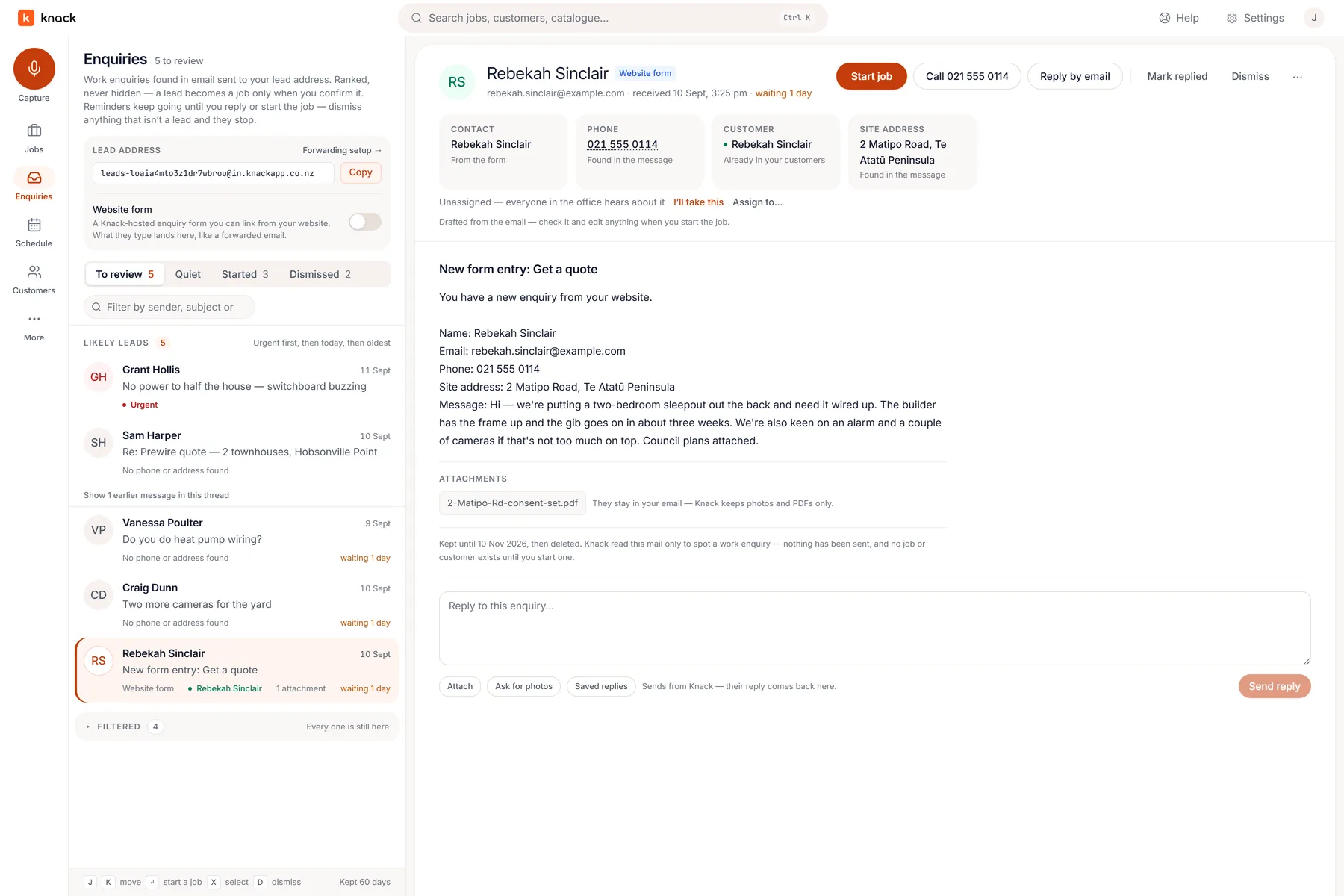
Forward your whole inbox to Knack — no picking and choosing — and the enquiries sort themselves: website forms, builders' emails, a customer asking for one more thing. Likely leads float to the top, and turning one into a job is a single press.
- Ranked, never hidden. Urgent first, then oldest — and whatever Knack sets aside stays one tap away, so a real lead can't quietly vanish.
- The details find themselves. Name, phone and site address are pulled from the message and drafted onto the job — you edit anything when you press Start job.
- Nothing slips while you're on the tools. A likely lead left unanswered — or a customer's reply still waiting on you — can nudge your phone on the schedule you choose. Reply, book it, or dismiss it and the reminders stop.
- Your inbox stays yours. Knack reads the mail only to spot work enquiries. Nothing is sent on your behalf, and no job or customer exists until you start one.
For security & CCTV
Show them exactly what the cameras see.
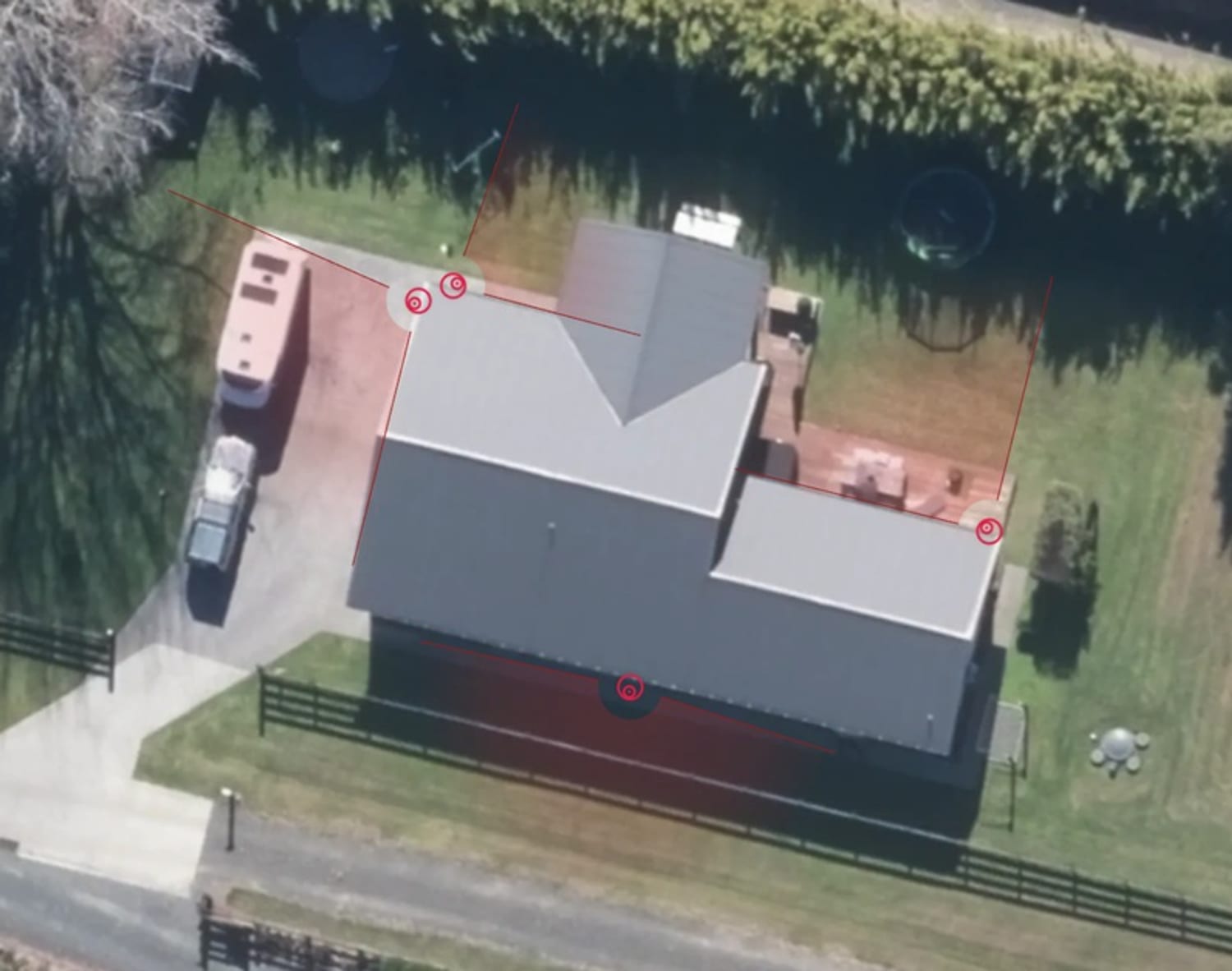
Quote CCTV off a real aerial of the property — not a Google Maps screenshot pasted into a PDF. Capture the site, place the cameras, and fan out the coverage the customer is actually buying.
- Capture the site from the air. Type the address, frame the property on live aerial imagery, and Knack pulls in a crisp aerial to work on.
- Place every camera where it mounts. Drop cameras on the roofline and walls, exactly where the install goes.
- Fan out adjustable coverage. Angle and widen each camera's field of view, so the customer sees the coverage — and the gaps — at a glance.
- It becomes the quote. The annotated aerial flows into your branded quote and the accepted-scope record — a professional artefact, not a screenshot.
Product packs & points
The gear you fit, already on the palette.
A takeoff palette full of generic dots is a takeoff palette you have to translate. Switch on the product lines you actually install and the drawing speaks your gear — then each placement brings the parts and the labour that always went with it, and the sense check knows what a point is missing.
- Ajax Systems
- Hikvision
- HiLook
- Dahua
- TP‑Link VIGI
- Uniview
- Hanwha Vision
- Milesight
- Paradox
- Paradox M25
- Arrowhead
- Inner Range
-
The pack
379 products you can place
Twelve manufacturer lines under Security & CCTV, ticked on in onboarding or settings — a Hikvision installer never has to scroll past Ajax. Each symbol draws that product's published field of view or detection pattern: a 2.8 mm turret fans its own 108°, an outdoor curtain detector draws its two curtains. Every cone stays yours to drag, and it's a drawing aid for the conversation — never a detection or compliance guarantee.
-
The catalogue
Bound to a priced row
Every symbol arrives linked to a starter price-book row with the real model on it, so a placement is a priced line rather than a to-do. The prices are round scaffolding numbers — overwrite them from your own supplier list, or repoint the symbol at the SKU you stock. Knack has never claimed to know what you pay.
-
Your words
It talks like an installer
Each pack ships the vocabulary its installers use, so a voice note that says "turret on the corner of the shed" lands on the right product instead of a generic camera — and the design checks read that line's own numbers.
- Bullet camera unit6
- Wall bracket / junction box6
- Cat6, camera‑to‑recorder allowance150 m
- RJ45 terminations & accessories6
- Mount, cable, terminate, aim, commission6
Six placements, five lines and the labour — at your parts, your allowance and your rate.
A point, not a part.
Forty placements used to mean forty units on four lines, and then you added the cable, the sundries and the hours by hand. Now the point carries them.
- Eleven points ready to go. Dome, bullet and PTZ camera points, PIR sensors, door contacts and alarm keypads on the security side; downlights, double GPOs, light switches, smoke alarms and isolating switches on the electrical side.
- Your rates, or nothing at all. The templates say what is in a point — never what it costs or how long it takes. They land in your library marked "needs your rates", and nothing seeds onto a quote until you've put your own numbers on them. Knack does not generate trade pricing.
- The count still follows the plan. Add a camera to the drawing and the whole point comes with it; take one off and it goes. Edit a line by hand — 45 m of cable instead of 25 — and that line is yours from then on. The plan stops touching it.
- Detailed for you, simple for them. You see the full build-up with cost, markup and margin behind it. The customer sees "Bullet camera point × 6" at one price — the build-up never leaks onto their quote.
It notices the companion nobody prices.
The sense check has always read the drawing. Now it reads the quote as well — the small, expensive omissions that only show up on install day. It runs when you ask for it, before you send: no badge, no pop-up, no alert that goes off while you work.
- Cameras with nothing on the quote to record to. No recorder and no memory card — if they record to the camera, the card usually goes on the quote too.
- Nothing on the quote powers the cameras. PoE cameras with no recorder, no PoE switch and no injector.
- No drive alongside the recorder. Most ship bare — worth checking whether the drive comes in the box or belongs on the quote.
- No standby battery, or no comms path, with the alarm panel. Fine for a local bells-only system — otherwise it's the module that gets left off.
- Points on the quote with no cable. Fine if it's inside your install rate — otherwise it may be missing. Electrical gets the same treatment, plus data outlets with nothing to terminate into.
No drive alongside the recorder. This quote prices 1 recorder hardware and no separate drive. Most ship bare — worth checking whether the drive comes in the box or belongs on the quote.
Nothing on the quote powers the cameras. 6 PoE cameras are on this quote with no recorder, no PoE switch and no injector. Worth a look at what is feeding them before this goes out.
Every one of these is a note, never a blocker, and every one goes quiet the moment your quote already answers it — a tagged catalogue row, a kit that includes it, a line in your internal notes, or a sentence in your exclusions. You can always send.
Capture on site
Say it once. Knack does the typing.
The best notes you'll ever take are the ones you say out loud while you're standing in the room. Record as you walk — Knack drafts your words into structured scope, ready to review and price when you're back at the ute.
- Hands stay free. No clipboard, no thumb-typing in the hallway — just talk and keep moving.
- Nothing gets forgotten. The detail you'd normally lose between the site and the desk is captured the moment you notice it.
- A note can start the whole job. Talk before there's a customer record, a plan, or a quote — Knack builds the job around what you said.
- Every line is a draft. You review, edit, and approve before anything reaches the quote — it's your scope, not the machine's.
Bring your own AI
Work the big job up with your AI. Land it in Knack.
This is for the big ones — the shop fit-out on an architect's electrical set, the commercial kitchen, the renovation with more sheets than rooms. The session works out the gear from the drawings, estimates the labour from the facts you give it, checks the rules you feed it, and finds the questions to put to the client. Knack doesn't try to be that conversation. It arms it, and takes the answer back as a draft quote.
A working pack file leaves Knack for the contractor's own AI; a short conversation over an architect's electrical set settles the gear, the labour and the price of a commercial kitchen fit-out; a handoff file comes back and Knack drafts the quote lines from it, with the agreed price shown beside the build-up.
-
1
Download the working pack
From the job: your real catalogue with pack ids, your rates, the questions a thorough estimate asks, how a Knack quote is shaped, your standard terms and the handoff format. One plain file that says what it holds, so you decide who sees it.
-
2
Have the session
Attach the pack, the architect's drawings and the rules you work to — Claude, ChatGPT, Grok or Gemini, whichever you already pay for. Knack gives you the message to open with. Talk gear, labour, supply and what to ask the client, until the price is agreed.
-
3
Bring the reply back
Knack gives you the message to finish with, and the AI writes the handoff. Paste that reply into the job, or drop in the file. Knack reads the handoff block at the end and keeps the rest with the quote, as the record of how the price was reached.
-
4
Edit the draft
Catalogue items linked, agreed prices carried, unknowns left TBC, and the agreed price beside your build-up while you close the gap. A newer handoff updates the same draft and leaves your edits alone.
Owner and estimator roles only — the pack carries your costs and margins. Knack never sends it anywhere: you download it, and you carry it.
Your own history, working for you
It remembers the line you always forget.
Every contractor has one — the thing you put on every job of this type, right up until the night you're rushing and you don't. Knack learns your job types from the quotes you've won, and tells you what's missing while the quote is still a draft.
- "You've had this on 9 of 9 villa rewires." Not a guess from a generic library — a count from your own accepted quotes.
- Price from evidence, not memory. Similar past jobs sit alongside the draft, so you can see what this actually went out at last time — and what it went out at when you won.
- A margin audit you can pull. Check this quote's margin against the job type's history before you send, not after you've been burnt.
- It gets sharper as you go. Every quote you win teaches it what your version of this job looks like.
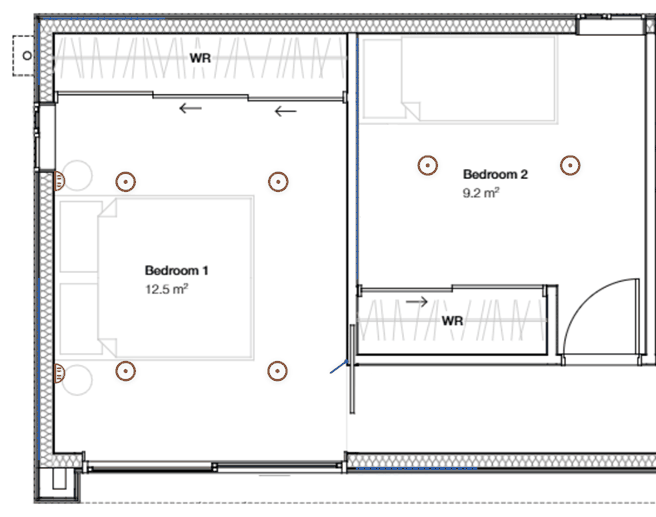
A conversation, not a one-way PDF
If they want a tweak, they point at it.
On the very same quote link, your customer can mark up the plan and ask for a change — right where they mean it. It comes back to you as a clear request, and you send the revision. No phone tag, no "the third light along."
- Pin the plan, not a paragraph. They drop a marker exactly where they want a change, with a note in their own words.
- Move, remove, add — mostly done for you. Requests land in a spatial inbox against the quote, and the straightforward ones are applied to your draft for you to approve.
- The record stays clean. Nothing the customer marks up changes the quote until you re-issue it — your accepted scope never drifts.
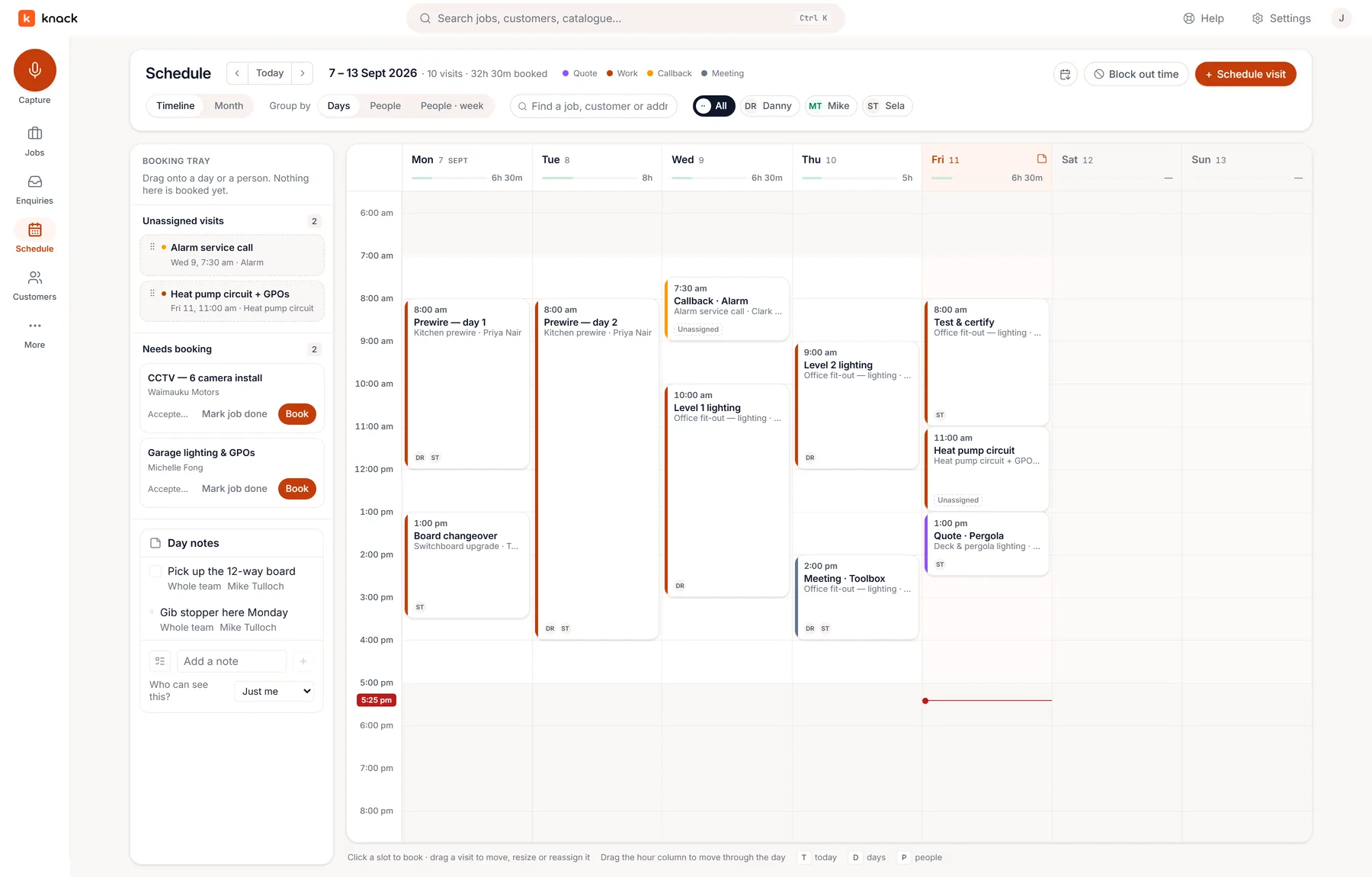
After the yes
Won the work? Get it booked.
An accepted quote doesn't fall off the end of Knack. The job carries on — numbered, statused, and on a schedule the whole crew can read.
- A booking tray, not a blank calendar. Accepted jobs queue up ready to book — drag a visit onto a day or a person and it's set.
- The crew see their day. Who's where, when, with a phone-sized run sheet — start and finish the visit from site.
- Your calendar stays in the loop. Subscribe from Google or Apple Calendar and every booked visit is there — no double entry.
- A status you control. From booked to done, the work status is yours to set — Knack never marks a job finished for you.
- It remembers the comebacks. Mark a job done and note the return service — 6, 12, or 24 months. When it's due it surfaces on the booking tray, ready to start as a job, and repeats without a spreadsheet. Annual alarm services stop slipping through.
Questions
Fair questions, straight answers.
What do I actually get in the free trial?
Thirty days, no credit card, and the whole product at the Pro level — capture, takeoff, auto-count, the builder, sending, real customer acceptance, plus scheduling, job costs and the enquiries inbox. It includes 60 voice captures and 180 minutes of recording across the trial. Nothing is held back during the trial. Afterwards, every plan keeps the complete quoting workflow and the enquiries inbox; Pro adds running the job — scheduling, job costs and the Xero handoff. The honest way to judge it is to put one real quote through it.
Is my trade supported?
Straight answer: Knack is aimed at electricians and security / CCTV installers today. Those are the two trades we ship ready-made symbol libraries and starter price-book catalogues for, and they're the jobs the takeoff is tuned around. Solar is in early access and switched on account by account while we build it alongside working installers. Everything else — voice capture, the price book, the builder, sending, acceptance — is trade-agnostic, so another trade can absolutely use it by building its own catalogue and symbols first. We'd rather tell you that up front than have you sign up expecting a plumbing palette that isn't there yet. More trades are coming; ask us where yours sits.
Does it know the brands I fit?
Twelve of them, on the security side: Ajax, Hikvision, HiLook, Dahua, TP‑Link VIGI, Uniview, Hanwha Vision, Milesight, Paradox, Paradox M25, Arrowhead and Inner Range. Tick the lines you install — in onboarding or in settings, any time — and their products land on your takeoff palette, each one drawing that product's published field of view or detection pattern and bound to a starter price-book row with the real model on it. The starter prices are round numbers to overwrite from your own supplier list; Knack has never claimed to know what you pay. Cameras are symbolised by body and lens rather than SKU — the CCTV catalogues run to thousands of part numbers — so you point the symbol at whichever model you stock. See what a pack ships →
Can I still send a PDF?
Yes. Your customer gets the live quote link, and they can download the quote, your terms, and the marked-up plans as PDFs from it. The acceptance receipt is a PDF too. We just don't think the PDF should be where the quote ends — some customers want a document for their records, and they get one.
Is this another job-management system I have to migrate everything into?
There's nothing to migrate. Knack starts where the work actually starts — an enquiry in your inbox — and runs it through quoting to a signed acceptance, then onto a schedule so the won job gets booked and done. What it deliberately doesn't do: debt chasing or a second set of books. Your accounts stay in Xero.
Am I paying for every person on the team?
No. Knack is priced per workspace, not per seat. Invite your estimator, your office admin and your crew at no extra cost — they share one workspace, one set of records and one monthly voice allowance. Roles control who sees costs and margin.
Do I need to be good with computers?
If you can send a text and take a photo, you can run Knack. Capture happens by talking; the takeoff is tap-on-the-plan; and the quote builder fills itself in from what you've captured. It works on your phone on site and on the desktop in the office.
What does my customer actually see?
A clean, professional quote page under your business's branding — scope, options they can select, terms, and one clear button to accept. They never see your costs, margins, or internal build-up, and they never see Knack's brand pushed in front of yours. You can preview the exact page on your own phone before you publish it.
How does the auto-count know what it's looking at?
You teach it, one box at a time. Draw around a symbol on the drawing and Knack matches that shape across the sheet, then shows you every hit as a candidate. You accept the good ones and throw out the rest — it never silently adds anything to your count. On a messy scan you'll reject a few; on a clean consultant PDF it's the difference between an evening and a coffee.
Can Knack catch mistakes before I send?
It can help. Before you send, you can run an optional sense check — a quiet once-over that flags things worth a second look, like a line that reads oddly or an option that doesn't add up. It reads your drawing and your quote, so it also catches the companion nobody prices: cameras with nothing to record to, a recorder with no drive, an alarm panel with no standby battery or comms path, points with no cable. Each one is a note, not a blocker, and each goes quiet the moment your quote already answers it. It never blocks you and never nags: it's there when you pull it, and the call is always yours.
Will the AI send something wrong to my customer?
It can't — nothing is ever sent automatically. AI output in Knack is always a draft: it's marked as such, it stays editable, and it only becomes part of the quote once you've reviewed it and pressed Send yourself.
Does AI fill in my certificate?
No — and that's deliberate, not an oversight. Nothing on the certificate path is AI-assisted: no drafted test values, no suggested declarations, no tidying of the legal wording. What arrives prefilled comes from the job's own records — the site, the customer, a starting description of the work, and what the certificate relies on. The test results, the dates, the supply system, the risk category, the declaration and your signature are never filled in for you. You're the licensed person signing it, and Knack doesn't decide whether the work passes.
Can I use ChatGPT or Claude to work up a quote?
Yes — and it's built for exactly the jobs you'd do that on: a shop fit-out on an architect's electrical set, a commercial kitchen, a house-sized renovation, where the session is about the gear, the labour, the supply and what to ask the client. From any job, download a working pack: one plain file with your real catalogue and rates, the questions a thorough estimate covers, and the shape of the handoff to end with. Have the session on the AI subscription you already pay for, with the plan alongside; Knack even gives you the message to start with and the one to finish with. When the price is agreed, paste the reply back into the job and it becomes a draft quote — catalogue items linked, agreed prices carried, every line still yours to edit. Knack never sends your data to an AI provider itself: you download the pack and you carry it, and the download says plainly that the file holds your costs and margins. Or skip the file: connect ChatGPT, Claude, Grok or the tools on your laptop to Knack and the session reads your catalogue and drawings live and writes the draft back itself. See the round trip → Set up your AI →
What happens when the customer wants changes after accepting?
You send a new revision. The old version is superseded and its link retired, so there's never confusion about which quote is live — and the original acceptance record stays intact, exactly as it was agreed, for as long as you need it.
Does Knack do invoicing?
Yes, with Xero, in New Zealand. Once you turn it on, Send invoice on the job approves the invoice in your Xero — the deposit straight after acceptance, the balance when the job's done — and emails it to your customer with your bank details and the job number as the reference. Xero keeps the books and says what's been paid; Knack never chases a payment or keeps a ledger of its own.
Bring a plan. Put it
through. See for yourself.
Thirty days, every feature, no credit card. The fastest way to judge Knack is on a job you actually have to price.