

Guides · Choosing software
Tradify vs Fergus: which suits an NZ electrical or security business?
Tradify and Fergus are the two job-management tools NZ electricians and security installers most often shortlist. They cover much of the same ground, so the useful question is where each one leans. Everything below about them comes from their own websites and help centre, checked on 28 October 2026. If most of your hours go into pricing rewires or camera installs off a plan, read the last few sections too: that's the job Knack is built for.
About a 7-minute read
Knack makes quoting software, so we have a side in this. That's why every Tradify and Fergus detail here comes from their own pages, why we don't print their prices, and why the section about Knack is the last one and says so in its title.
-
What they both do
Both are full job-management systems: enquiries, quotes, scheduling, job records, timesheets, invoicing and online card payments, with iOS and Android apps for the crew, and site safety forms, though on both some of that (timesheets and safety forms among it) sits on the upper plans. Both connect to Xero, MYOB and QuickBooks, so invoices and payments reach your books without re-keying.
On both, your customer can accept a quote straight from the email you send (on Tradify, from its Pro plan). Both offer a 14-day free trial, and both charge per user per month on a feature tier, so the bill grows with the team. Prices change, so read their pricing pages rather than anyone's summary, ours included.
-
Where Fergus leans: your suppliers
Fergus is built around your suppliers. You upload supplier price books once and Fergus adds the up-to-date price as you build a quote, and it imports supplier invoices and matches them to the right job. Its pricing page names Plumbing World, Mico, Corys, PlaceMakers and ITM among the NZ suppliers it imports from, and its electrical page names Mico and L&H.
On quoting, Fergus keeps every version of a quote while you negotiate, lets you set tiered markups by client or job type (Pro plan), and since April 2026 offers good / better / best packages and optional add-ons within a single quote.
Its own pages also make a point of an offline mode in the Fergus Go app (out of beta in August 2026), Fergus Assistant (September 2026), which lets the crew type or speak on site to update jobs and time, a support team it describes as local, with phone support on its Professional plan, and certificates as a paid add-on on either plan.
-
Where Tradify leans: subbies and certificates
Tradify makes subcontractors easy. On its Pro plan and up you schedule them at no extra cost, and they get a free version of the app to see their appointments and accept or decline work.
For electricians, the same Pro plan includes digital Certificates of Compliance and Electrical Safety Certificates, alongside JSA and other safety forms, created, signed and sent from the app. It also adds quote options with online acceptance, so a customer can choose extras and accept from the email, and timesheets.
Supplier price lists are imported as CSV files. On the Plus plan, SmartRead reads supplier bills and SmartWrite helps with wording, and an Instant Website add-on is available on every plan. Tradify also offers free one-on-one training and phone support.
-
How to choose between them
Start with the problem that costs you the most hours, not the longest feature list. Some rules of thumb, each based on what the two companies say about themselves:
- Lots of wholesaler invoices to matchFergus's supplier integrations are what it is built around.
- Lots of subbiesTradify's free subcontractor app keeps them on the schedule without a paid seat each.
- CoC and ESC without an add-onCheck the tier: Tradify includes them from its Pro plan; Fergus sells certificates as an add-on.
- A growing teamBoth bill per user, so price your actual headcount, office included, on each pricing page.
- Most of your time goes on pricing off plansIf counting points or placing cameras is the slow part, look at a quoting-first tool as well. Ours is below.
Then put the same real job through both trials, from enquiry to invoice. Fourteen days is enough for one job each, and you'll learn more from that than from any comparison page, this one included.
-
If you're a sparky or a security installer (our side of it)
This is where we stop being neutral. Tradify and Fergus are built for many trades: Tradify's trades page runs from plumbing and HVAC to property maintenance, and Fergus lists plumbers, builders, roofers and pest control alongside electricians. Both are built to run the job once you've won it, and their quoting starts from your price book and your supplier prices. For an electrician or a security installer, though, the expensive hours come before the yes: counting points off a plan, working out the cable and labour behind each one, and getting the customer to see what they're paying for. Knack is built for NZ electricians and security installers, and it's built around that part of the work.
The next two sections show what that means for each trade. Everything in them is in Knack now, not on a roadmap.
-
For electricians: the plan does the counting
On a rewire or a new build, the quote is only as good as the count. In Knack the count comes off the drawing, and each point arrives priced with the parts and labour behind it.
- Takeoff that counts itselfMark up the consultant's PDF, or draw the plan in the browser if there isn't one. Box one downlight and Knack finds the rest on the sheet, and every count flows into the quote.
- A point, not a partA downlight, GPO, switch, smoke alarm or isolator point brings its cable, sundries and labour with it, at your rates, confirmed once in settings.
- Your switchgear rangePDL Iconic, Vynco, Legrand, HPM, Voltex, Hager and more. Set your usual once, or give a job its own range and colour. A line in another range gets flagged, and Knack never swaps it for you.
- Talk the job as you walk itVoice notes come back as draft scope lines, ready for you to check and price before you reach the van.
- CoC and ESC from the jobOn the Pro and Crew plans, issue the certificate on your phone from the job itself. The site, the customer and the work are already in it.
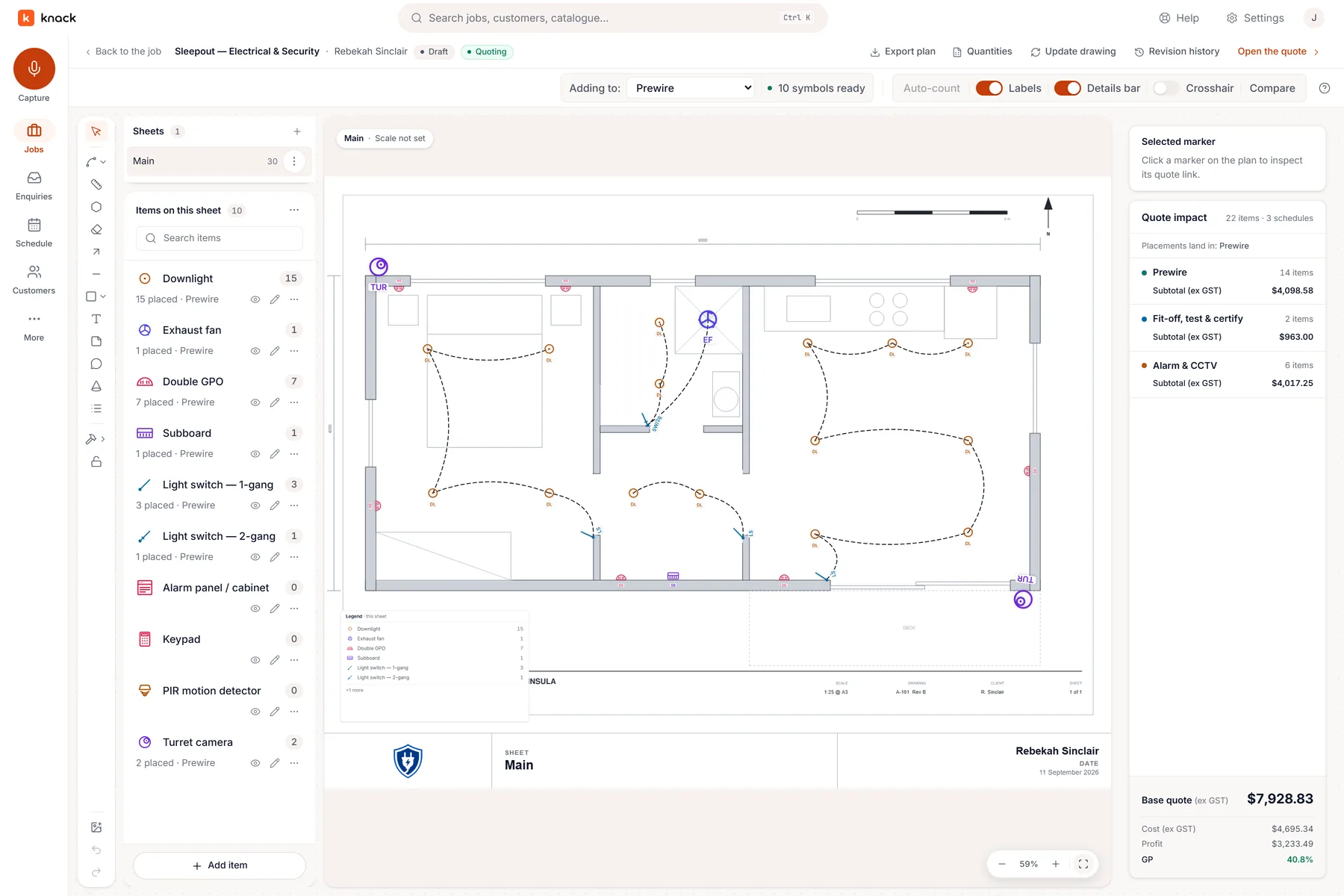
In Knack: the plan marked up, every point counted. -
For security and CCTV installers: sell the coverage
Customers can't tell from a list of cameras whether the back door is covered. In Knack you quote from a coverage plan drawn on their own property.
- Cameras on the real propertyKnack pulls aerial imagery of the address from LINZ. You drop each camera where it goes, set its direction and field of view, and the customer sees what every lens covers.
- Capacity checked as you designChannels, PoE budget and recorder storage add up while you place, so an eight-camera job doesn't go out with a six-channel NVR.
- The gear you fitAjax, Hikvision, HiLook, Dahua, VIGI, Uniview, Hanwha, Milesight, Paradox, Arrowhead and Inner Range, each drawing its published coverage. Your own products go on the palette too.
- Every camera is a quote lineA camera point brings the unit, bracket, cable allowance and labour with it, so the drawing and the price never drift apart.
- Servicing comes back aroundNote the return service when the install wraps up, and the annual check lands back in the tray when it's due.
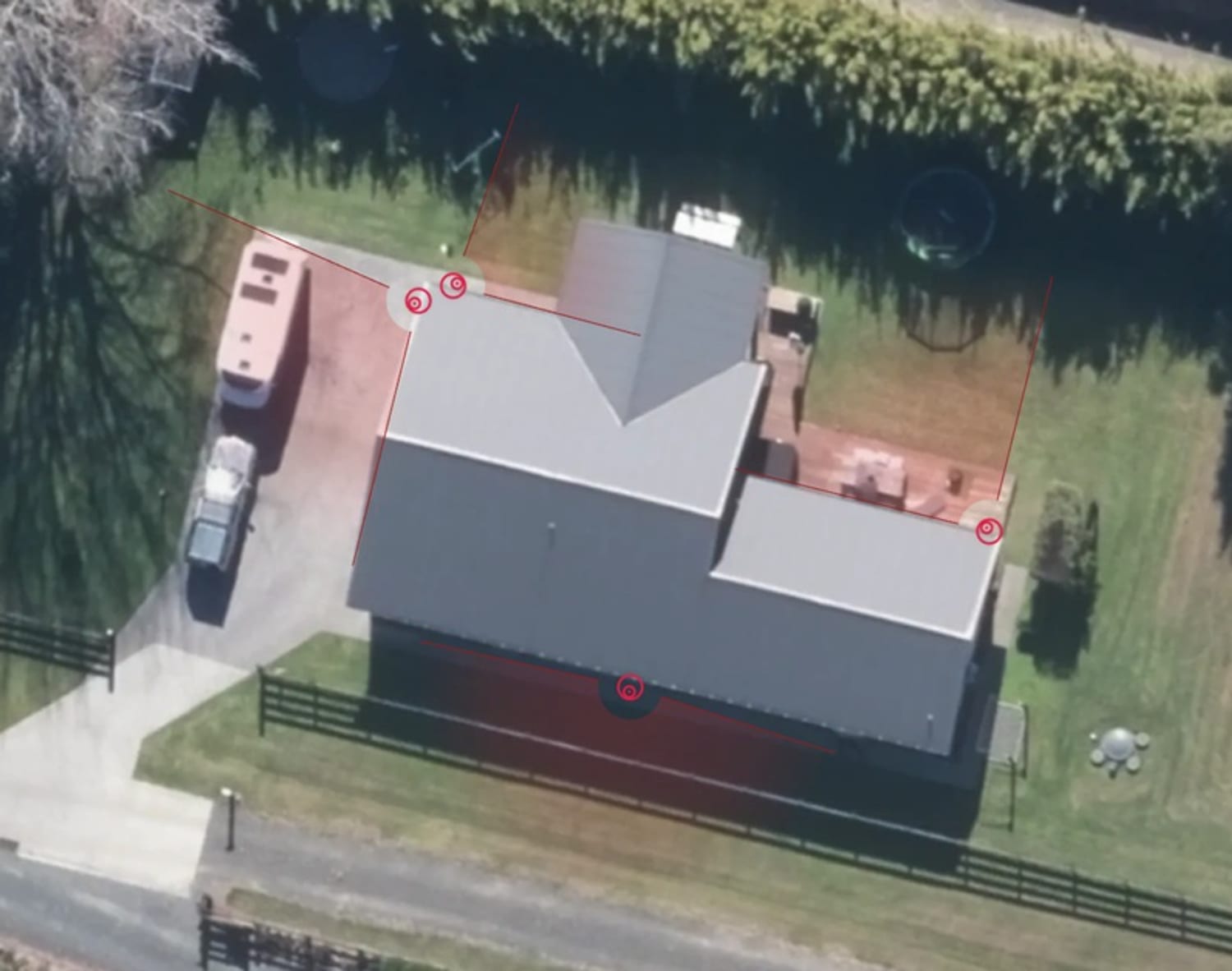
In Knack: a coverage plan on the customer's own property. -
The quote, the yes, and what comes after (our side of it)
For both trades, the customer opens one link, with no login and no app. They choose between good, better and best, add extras, pin change requests on the plan instead of phoning you, and accept against a signed declaration. That's a clear record to invoice against if anyone disputes the scope later.
On the Pro and Crew plans, the won job is then booked, crewed and run in Knack, and the invoice is raised in your Xero (New Zealand), where the books stay. Knack doesn't chase payments and has no card payments yet. It's priced per workspace, not per user: from NZ$49 a month for the whole business, office and crew included.
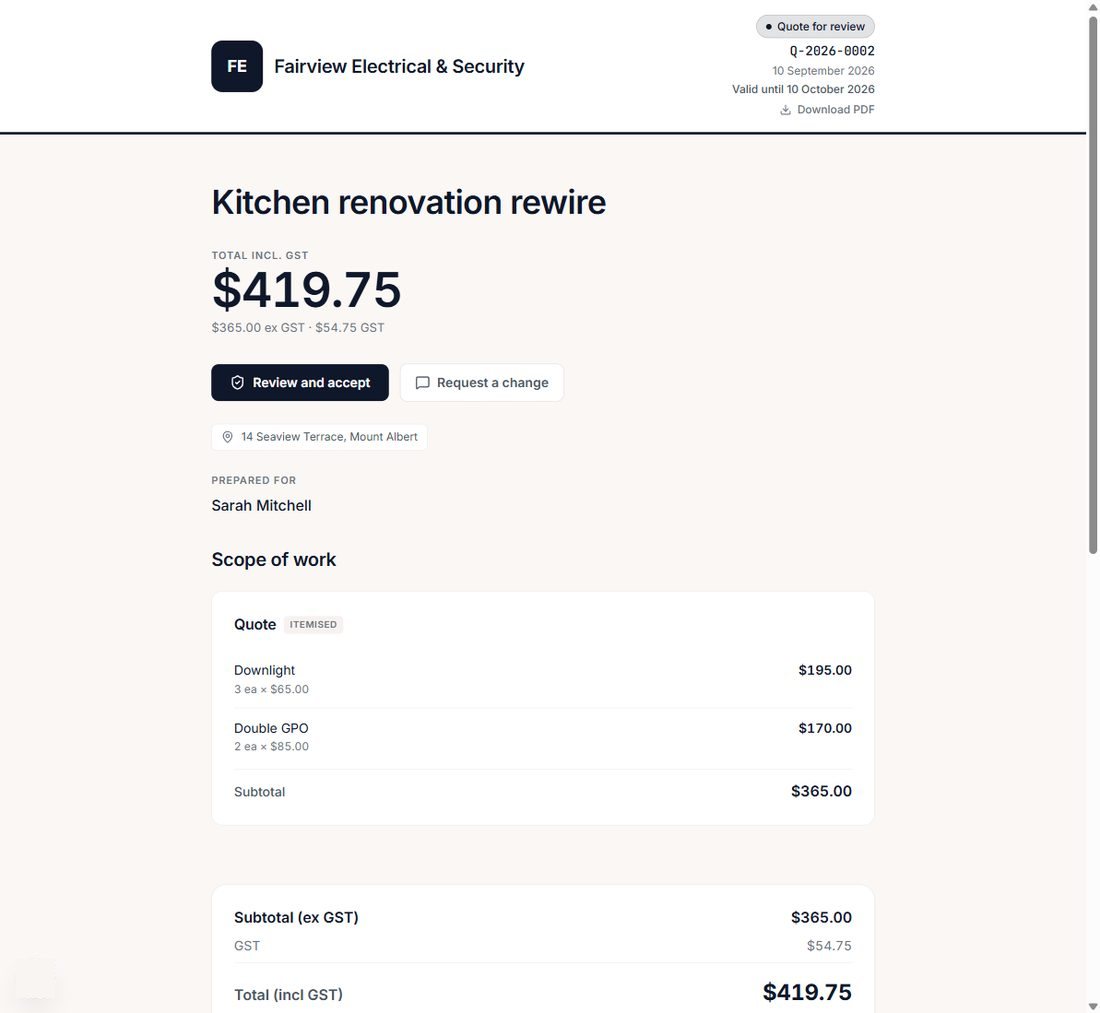
Knack's customer quote page: no login, no app to download. -
Already on Fergus or Tradify? Keep it while you try
You don't have to move everything at once. Connect Fergus and your customers come straight across, and while you're switching, each accepted job can go back to Fergus as a job, or to Xero as a draft invoice. From Tradify or ServiceM8, your customer list comes across from an export.
The fair test is to quote your next real job in Knack, a rewire or a camera install, alongside what you use now. The full side-by-side, including where Tradify and Fergus are ahead of us, is on the comparison page.
Checked on 28 October 2026
Every Tradify and Fergus detail above comes from their own websites and Fergus's help-centre release notes, read on 28 October 2026, not from review sites. Both ship changes often, so check their current pages before you decide. If something here has gone out of date, tell us through the support page and we'll correct it.
Try it on a job you're pricing this week.
Thirty days, every plan feature, no credit card.